Table of Contents
What is a Business Glossary? 2026 Guide + Free Template
📌 QUICK ANSWER
A business glossary is a centralized repository of standardized business terms and definitions that ensures everyone in your organization speaks the same data language. It serves as the single source of truth for business terminology, eliminating confusion and enabling confident decision-making.
Before I dive into what a business glossary is and how best you can develop one for your organization, I want to use a famous example that shows the consequences of what happens when terms and definitions aren't universally understood.
When Elon Musk decided to proceed with his plan to acquire Twitter for $44 billion, the deal almost fell apart because of a single metric. When examining monetizable daily active users (mDAUs), Musk questioned Twitter's calculations that claimed just 5% of users represented fake accounts, which couldn't be monetized. Musk predicted this number to be much higher.
When Twitter provided information regarding the methodology they used to calculate this metric, it turned out that the company was using survey data from just 100 respondents. Five of those turned out to be fraudulent accounts.
So what went wrong? While the term mDAU was standardized, the definition wasn't clear. Not every party had a say in how the metrics were calculated, and at least one concerned party felt the methods for obtaining the data needed revision.
Organizing business terms and establishing a standardized model for how business users reference and define them can be a significant pain point for companies.
A business glossary is an efficient, scalable, and reliable way of curating and standardizing critical business terminology for every stakeholder in an organization. That's why it has become crucial to every comprehensive data governance strategy.
What is a Business Glossary? Complete Definition
Non-standardized business terms are a huge problem for companies, especially as the number of data sources and applications used by different departments grows. Business users can't work independently or collaborate on analytics tasks when there is no cohesion because the risk of flawed data is too high.
The fallout from skewed data can significantly impact brand integrity, data adoption, and compliance commitments.
A business glossary is a tool for curating your business terms and providing standardized definitions. With this authoritative source, users can rest assured that they have the right business terminology at their disposal.
Curating a business glossary has become an essential part of every forward-thinking data governance strategy, and as such, there are a series of tried and tested steps that lead to the development of a reliable framework.
Think of a business glossary as your organization's dictionary, but instead of defining general words, it defines the specific terms your business uses. Terms like "customer," "revenue," "active user," or "conversion" might mean different things to different departments.
A business glossary ensures everyone uses the same definitions.
Simplified business glossary example in OvalEdge
Related Short Video: How Business Glossary Works?
Key Components of a Business Glossary
A comprehensive business glossary contains several essential elements that make it functional and valuable:
|
Component |
Description |
Example |
|
Term Name |
Unique identifier for the business concept |
"Customer Lifetime Value" |
|
Business Definition |
Clear explanation in plain language (40-100 words) |
"Total revenue expected from a customer over their entire relationship with the company." |
|
Owner/Steward |
Responsible person with contact information |
Sarah Chen, VP Analytics, sarah.chen@company.com |
|
Category/Domain |
Logical grouping |
Finance > Revenue Metrics |
|
Synonyms/Aliases |
Alternative terms used |
CLV, LTV, Lifetime Value |
|
Related Terms |
Connected concepts |
Customer Acquisition Cost, Retention Rate, Churn Rate |
|
Status |
Approval state |
Approved, Draft, In Review, Retired |
|
Data Sources |
Where the term is used |
CRM system, Sales reports, Marketing dashboard |
|
Business Rules |
How the term is calculated or applied |
Formula: Average Purchase Value × Purchase Frequency × Customer Lifespan |
This structured approach ensures that every term in your glossary is documented consistently and provides all the context users need to understand and apply it correctly.
Why Do You Need a Business Glossary?
Standardized business terms enable communication and collaboration within an organization. When communication channels are lacking in breadth and accessibility, the results can be damaging, especially if you're committed to developing a data-driven culture in your company.
According to a 2018 report by The Economist, communication barriers led to:
- 44% of respondents cited delayed or failed projects
- 31% reporting low morale
- 25% missing performance goals
- 18% losing sales
When everybody in your organization uses the same terms and definitions determined by a business glossary, analytics are streamlined and trustworthy. This helps drive successful innovations and boost data literacy.
Furthermore, users have an exact source of reference so they can communicate more efficiently about business matters and collaborate on data assets with confidence.
Related Video: How a Business Glossary can help with Data Literacy
Key Benefits
A business glossary provides multiple strategic advantages:
For Business Users:
- Work independently without constant clarification
- Collaborate on analytics with confidence in data definitions
- Self-service access to trusted terminology
- Faster report creation and analysis
For Data Teams:
- Reduced burden from terminology questions
- Clear data ownership and accountability
- Better data quality through standardization
- Streamlined data governance processes
For Organizations:
- Control over high-risk business processes (regulatory reporting, financial statements)
- Elimination of costly misinterpretations
- Foundation for successful data governance initiatives
- Improved compliance and audit readiness
Real-World Impact Example
In practice, if one department uses the term "paid" to describe a fulfilled invoice while another uses "PD," it would be impossible for that organization to accurately determine profits based on the raw data.
A business glossary resolves this by establishing one standardized term and definition that everyone follows.
I've seen firsthand how pressure on data teams and the complexity of data management tasks are alleviated when an active business glossary is in place. Users have direct access to a trusted source and can independently search for business terms.
The process of building a business glossary also establishes ownership of data assets, a key function of data governance.
Related: Building a Business Glossary
Business Glossary Examples: Industry-Specific Use Cases
To understand how business glossaries solve real-world problems, let's look at specific examples from different industries:
Example 1: Financial Services - Defining "Customer"
The Problem: A retail bank discovered its reports were combining personal and corporate accounts incorrectly because different divisions used "customer" differently.
Different Definitions:
- Retail Banking: "Customer = individual account holder with Social Security Number."
- Corporate Banking: "Customer = legal entity with 20-digit Legal Entity Identifier (LEI)"
- Wealth Management: "Customer = high-net-worth individual with $1M+ in managed assets"
Business Glossary Solution: The bank created three distinct terms:
- "Retail Customer" (individuals)
- "Corporate Customer" (businesses)
- "Wealth Management Client" (HNW individuals)
Each term had clear definitions, ownership, and usage guidelines. Cross-divisional reports now accurately segment by customer type.
Example 2: Healthcare - Standardizing "Patient Visit"
The Problem: Hospital executives couldn't get accurate visit counts because departments defined "patient visit" differently.
Different Definitions:
- Emergency Department: "Patient visit = any ER entry, regardless of treatment."
- Outpatient Services: "Patient visit = scheduled appointment only"
- Telehealth: "Patient visit = any virtual consultation over 5 minutes"
Business Glossary Solution: Standardized definition: "Patient visit = any documented patient interaction requiring clinical assessment, regardless of location or modality."
This enabled accurate reporting for billing, capacity planning, and regulatory compliance.
Example 3: E-commerce - Clarifying "Active Customer"
The Problem: Three departments had different definitions of "active customer," causing wildly different marketing strategies and revenue projections.
Different Definitions:
- Marketing Team: "Active customer = anyone who opened an email in the last 90 days."
- Finance Team: "Active customer = anyone who made purchase in last 12 months"
- Product Team: "Active customer = anyone who logged in last 30 days"
Business Glossary Solution: After cross-functional workshops, they agreed: "Active customer = account holder with transaction OR login within 180 days."
This unified definition aligned marketing campaigns, financial forecasts, and product development priorities.
Example 4: Manufacturing - Supply Chain Terminology
The Problem: Production delays occurred because purchasing and operations used different terms for the same inventory concepts.
Different Definitions:
- Purchasing: "Lead time = days from PO to delivery at warehouse"
- Operations: "Lead time = days from order to production line availability"
- Difference: 2-3 days for unloading and quality checks
Business Glossary Solution: Created two distinct terms:
- "Procurement Lead Time" (PO to warehouse)
- "Production Lead Time" (PO to production line)
Production scheduling became more accurate, reducing costly delays.
These examples demonstrate how a business glossary transforms ambiguous terminology into clear, actionable definitions that drive better business outcomes.
Business Glossary vs Data Catalog vs Data Dictionary
One of the most common questions is understanding how a business glossary differs from related tools. Let's break down the distinctions:
|
Aspect |
Business Glossary |
Data Dictionary |
Data Catalog |
|
Purpose |
Define business terms and concepts |
Document technical metadata |
Inventory and discover data assets |
|
Primary Audience |
Business users, analysts, executives |
Data engineers, developers, DBAs |
All users (business + technical) |
|
Content Focus |
Business terminology, definitions, business rules |
Tables, columns, data types, technical specs |
Metadata, lineage, data quality, usage |
|
Ownership |
Business/Data Governance teams |
IT/Engineering teams |
Data Governance teams |
|
Scope |
Organization-wide business language |
Per database or data source |
Enterprise-wide data ecosystem |
|
Example Entry |
"Customer Lifetime Value = total revenue from customer over relationship" |
"customer_id: INTEGER, PRIMARY KEY, NOT NULL" |
"Customer table in CRM system, 2M rows, updated daily" |
|
Key Question Answered |
"What does this business term mean?" |
"What is the technical structure of this data?" |
"What data assets exist and where?" |
|
Integration |
Links to data catalog and dictionary |
Links to data catalog |
Links to glossary and dictionary |
Business Glossary vs Data Catalog: Detailed Comparison
A data catalog pulls in all your metadata so you can quickly find, explore, and utilize data assets, regardless of where they originate in your data ecosystem. Conversely, a business glossary contains critical information about how the terms that describe this data should be understood.
Similarities:
- Both facilitate collaboration across teams
- Both enable self-service data access
- Both are essential components of data governance
- Both reduce the burden on IT and data teams
Key Differences:
- A business glossary ensures everyone speaks the same language
- A data catalog makes data universally discoverable and accessible
- Business glossaries focus on "what terms mean."
- Data catalogs focus on "what data exists and where to find it"
In practice, these tools work together. Your business glossary might define "revenue," while your data catalog shows you which tables and reports contain revenue data.
Business Glossary vs Data Dictionary: Detailed Comparison
It's easy to confuse a business glossary with a data dictionary, but they serve different purposes for different audiences.
Business Glossary (Business-Focused):
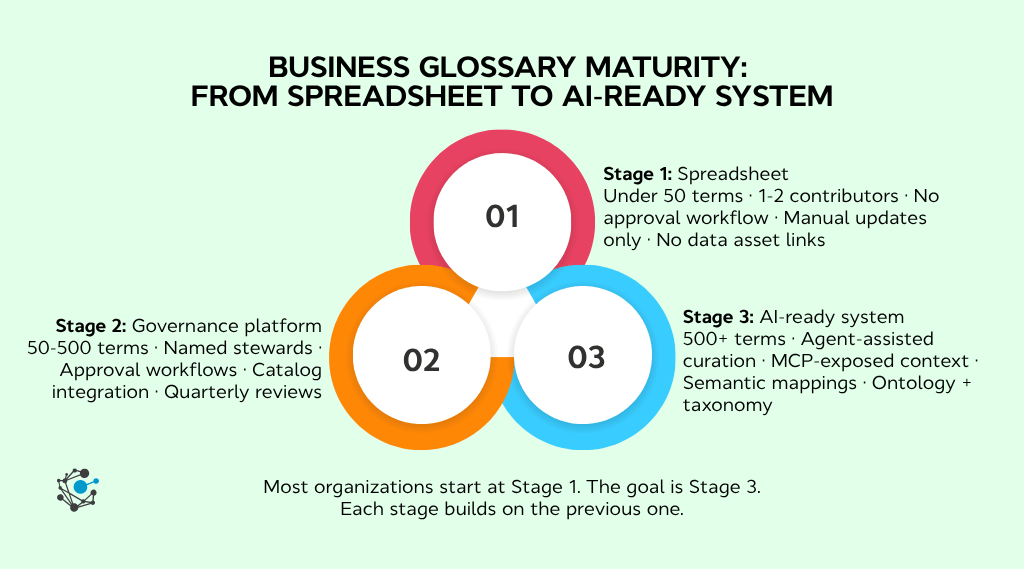
- Defines business terms in plain language
- Explains "what the business means" by terms like "customer," "revenue," "churn"
- Owned by business stakeholders and data stewards
- Used by analysts, executives, and business users
Data Dictionary (Technical-Focused):
- Documents technical metadata (tables, columns, data types)
- Explains "how data is structured" in databases and systems
- Owned by data engineers and DBAs
- Used by developers, data engineers, and technical teams
Example Comparison:
Business Glossary Entry:
- Term: Customer Lifetime Value
- Definition: The total revenue expected from a customer over their entire relationship with the company
- Formula: Average Purchase Value × Purchase Frequency × Customer Lifespan
- Owner: VP of Analytics
Data Dictionary Entry:
- Column: customer_ltv
- Data Type: DECIMAL(10,2)
- Table: dim_customers
- Constraints: NOT NULL, CHECK (customer_ltv >= 0)
- Source: Calculated field in ETL pipeline
Both tools complement each other. The business glossary defines what "Customer Lifetime Value" means to the business, while the data dictionary explains where and how that data is stored technically.
A data dictionary ensures data collection is consistent, regardless of where the data originates. It supports various data processes like lineage building, access management, and data mapping.
5 Common Business Glossary Challenges (And How to Overcome Them)
While business glossaries provide immense value, organizations often encounter challenges during implementation. Understanding these common obstacles helps you plan effectively:
Challenge 1: Labor-Intensive to Build
The Problem: Defining 500+ business terms manually can take months. Gathering input from subject matter experts, drafting definitions, getting approvals, and documenting everything is time-consuming. Many initiatives stall because the workload is overwhelming.
The Solution:
- Start small: Begin with your top 50-100 most critical terms, not everything at once
- Prioritize high-impact terms: Focus on terms used in regulatory reporting, executive dashboards, and cross-functional processes
- Use crowdsourcing: Enable department heads to define terms relevant to their area
- Leverage automation: Modern data governance tools can suggest terms from existing documentation
- Set realistic timelines: Plan for 2-6 months, depending on organization size
Success Metric: Most organizations see 60-70% coverage of critical terms within 3-4 months using this phased approach.
Challenge 2: Difficult to Standardize Across Departments
The Problem: Finance says "customer" means paid account. Sales says "customer" means any qualified lead. Marketing says "customer" includes email subscribers. Each department has legitimate reasons for its definition, making standardization contentious.
The Solution:
- Cross-functional workshops: Bring stakeholders together to discuss definitions collaboratively
- Document why definitions matter: Show the business impact of inconsistent terminology (mis-allocated budgets, wrong reports, poor decisions)
- Create variants when necessary: Instead of one "customer" term, create "Customer (Finance)," "Prospect (Sales)," and "Subscriber (Marketing)"
- Formal approval process: Establish a governance committee with decision-making authority
- Executive sponsorship: Get leadership buy-in to resolve disputes
Success Metric: Organizations with formal governance processes achieve 85%+ term approval rates within 6 months.
Challenge 3: Keeping It Updated
The Problem: Business glossaries become outdated within months without proper maintenance. New products launch, business processes change, and regulations evolve, but the glossary doesn't keep pace. Users stop trusting it and revert to asking colleagues for definitions.
The Solution:
- Assign term owners: Every term needs a designated data steward responsible for updates
- Quarterly review cycles: Schedule regular glossary audits (don't wait for problems)
- Automated change notifications: Set up alerts when related data assets change
- Version control: Track when terms were updated and by whom
- Usage monitoring: Tools like OvalEdge show which terms are accessed most frequently, helping prioritize updates
Success Metric: Organizations with assigned term ownership maintain 90%+ accuracy over time.
Challenge 4: Low User Adoption
The Problem: Teams spend months building a comprehensive glossary, but no one uses it. Users don't know it exists, can't find it easily, or don't understand how it helps their daily work. The glossary becomes a compliance checkbox rather than a useful tool.
The Solution:
- Embed in workflows: Integrate glossary into BI tools, data catalogs, and reports that users already access
- Make search easy: Users should find terms in seconds, not minutes
- Show value immediately: Demonstrate time savings and error prevention with real examples
- Training programs: 30-minute sessions for new employees and quarterly refreshers
- Gamification: Recognize power users and departments with the highest adoption
- Regular communication: Monthly updates highlighting new terms and improvements
Success Metric: Organizations with embedded glossaries achieve 70%+ user adoption within 6 months, compared to 20% for standalone tools.
Challenge 5: Disconnected from Actual Data
The Problem: The glossary exists in a separate system from the data catalog and data warehouse. Users can't easily see which tables, reports, or dashboards use specific business terms. The glossary becomes theoretical rather than practical.
The Solution:
- Choose integrated platforms: Tools like OvalEdge link glossary terms directly to data assets
- Map terms to tables: Show that "Customer Lifetime Value" is found in dim_customers.customer_ltv column
- Enable lineage: Display how business terms flow through ETL processes
- Bidirectional navigation: Users can click from the data catalog to the glossary and back
- Automated suggestions: The System recommends glossary terms when users explore data
Success Metric: Integrated glossaries see 3-4x higher usage than disconnected systems.
By anticipating these challenges and implementing proactive solutions, your business glossary initiative is far more likely to succeed and deliver lasting value.
Who is Responsible for Building a Business Glossary?
Building a business glossary is a collaborative effort that spans the entire organization. Success requires coordination across multiple roles and departments:
Primary Roles and Responsibilities
Data Governance Team (Overall Leadership)
- Oversees the entire glossary initiative
- Establishes standards and processes
- Resolves conflicts between departments
- Reports progress to executives
- Part of your overall data governance framework
Data Stewards (Term Owners)
- Draft and maintain definitions for their domain
- Gather input from subject matter experts
- Review terms quarterly for accuracy
- Approve changes and updates
- Learn more about data stewardship roles
Subject Matter Experts (Domain Knowledge)
- Provide domain expertise for term definitions
- Validate that definitions match business reality
- Identify synonyms and related terms
- Participate in cross-functional workshops
Business Users (Consumers & Contributors)
- Provide feedback on term clarity and usefulness
- Suggest new terms that need defining
- Use the glossary in daily work
- Report outdated or unclear definitions
IT/Data Engineering (Technical Integration)
- Implement glossary tools and platforms
- Link glossary terms to data catalog assets
- Maintain technical infrastructure
- Support automation and workflows
Executive Sponsors (Strategic Direction)
- Provide budget and resources
- Resolve high-level disputes
- Champion adoption across the organization
- Tie the glossary to business objectives
Collaboration is Key
This collaborative effort is crucial to understanding the terms in your organization that have the most significant impact. Critical terminology characteristically includes:
- Most frequently used terms: Terms that appear in daily conversations and reports
- Regulatory reporting terms: Terms required for compliance and audits
- Cross-functional terms: Terms used by multiple departments
- High-impact terms: Terms that affect major business decisions
- Ambiguous terms: Terms with multiple interpretations causing confusion
Regular business users are required to provide answers to survey questions and help determine which business terms are actively in use. Without this ground-level input, the glossary becomes disconnected from reality.
Simplified depiction of the OvalEdge data catalog
Business Glossary Template: What to Include
It's important to have a comprehensive template when building a business glossary for your organization. A well-structured template ensures consistency and provides all the information users need.
Essential Template Fields
Your business glossary template should include these core fields:
- Term Identification
- Term Name: Unique identifier (e.g., "Customer Lifetime Value")
- Abbreviations/Acronyms: Common short forms (e.g., "CLV," "LTV")
- Synonyms: Alternative names used across the organization
- Unique ID: System identifier for tracking and linking
- Definitions
- Business Definition: Plain language explanation (40-100 words) that any business user can understand
- Technical Definition: (Optional) More precise definition for technical teams
- Context: When and how the term is used in business processes
- Examples: 2-3 concrete examples showing the term in action
- Ownership and Governance
- Owner/Steward: Primary person responsible (name, role, email)
- Subject Matter Expert: Domain expert for questions
- Approved By: Person/committee who approved the definition
- Approval Date: When the term was officially approved
- Classification
- Category/Domain: Logical grouping (Finance, Marketing, Operations)
- Sub-Category: More specific classification
- Data Sensitivity: (Public, Internal, Confidential, Restricted)
- Regulatory Impact: Regulations this term relate to (GDPR, HIPAA, SOX)
- Relationships
- Related Terms: Connected business concepts
- Parent Terms: Broader categories this term belongs to
- Child Terms: More specific terms that fall under this one
- Data Sources: Systems where this term is used or calculated
- Business Rules
- Calculation Formula: How the term is computed (if applicable)
- Business Logic: Rules governing the term's use
- Valid Values: Acceptable values or ranges
- Constraints: Limitations or conditions
- Metadata
- Status: (Draft, In Review, Approved, Published, Retired)
- Version: Current version number
- Created Date: When first entered
- Last Updated: Most recent modification date
- Last Reviewed: Most recent quality check
- Change History: Log of modifications
- Usage Information
- Frequency of Use: How often the term appears in reports/queries
- Critical Reports: Key reports using this term
- Departments Using: Teams that rely on this term
- Questions/Clarifications: Common questions about the term

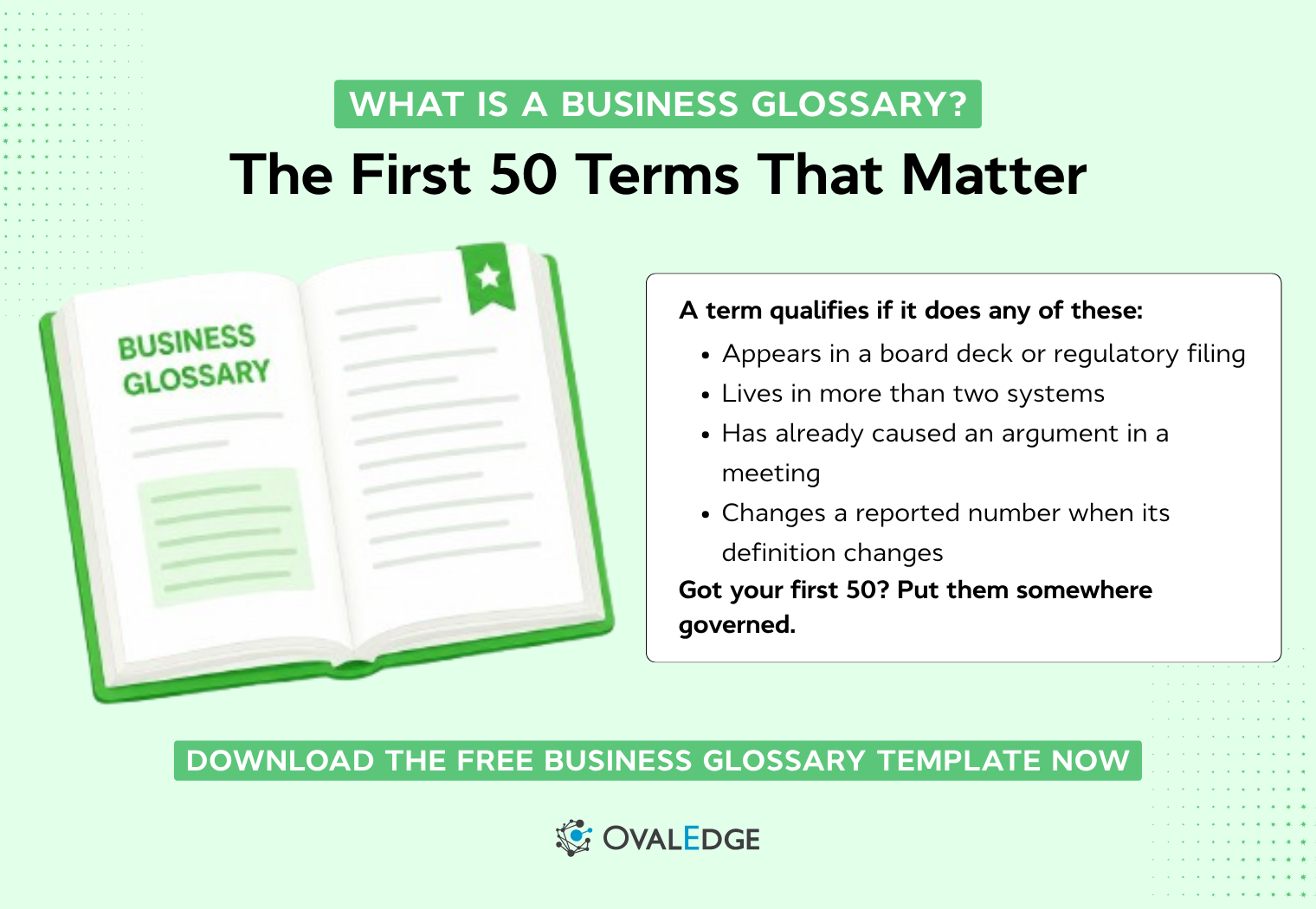
Need help building a business glossary? Download our free Business Glossary Template (pictured above)
How to Build a Business Glossary: 9-Step Implementation Guide
There are nine comprehensive steps to successfully building and maintaining a business glossary. Follow this proven methodology to ensure adoption and long-term success:
Step 1: Identify Key Stakeholders (Week 1)
Start by assembling your core team and identifying who needs to be involved.
Actions:
- Form a data governance committee with executive sponsorship
- Identify data stewards from each major department (Finance, Sales, Marketing, Operations, IT)
- Recruit subject matter experts with deep domain knowledge
- Assign clear roles and responsibilities
- Schedule kickoff meeting to align on goals and timelines
Deliverable: Stakeholder matrix with names, roles, and responsibilities
Step 2: Define Scope and Domains (Week 1-2)
Don't try to define every term at once. Start focused and expand gradually.
Actions:
- Choose 1-2 departments to pilot (typically Finance or Sales for high impact)
- Identify top 50-100 critical terms for initial phase
- Categorize terms by domain (Finance, Marketing, Product, Operations)
- Prioritize terms that are:
- Used in regulatory reporting
- Cause frequent confusion
- Appear in executive dashboards
- Critical for cross-functional collaboration
- Create an expansion roadmap for future phases
Deliverable: Prioritized term list with categories and implementation phases
Step 3: Audit Existing Documentation (Week 2-3)
Before creating new definitions, understand what already exists.
Actions:
- Review existing data dictionaries and technical documentation
- Examine process documentation and training materials
- Analyze reports and dashboards for commonly used terms
- Interview department heads about terminology inconsistencies
- Document variations and conflicts in term usage
- Identify terms with multiple definitions
Deliverable: Audit report documenting current state and gaps
Step 4: Choose Platform and Tool (Week 3-4)
Select the right platform for your organization's size and needs.
Options to Evaluate:
For Small Teams (<50 terms):
- Excel or Google Sheets
- Pros: Free, easy to start, full control
- Cons: No automation, difficult to maintain, no data asset linking
For Medium Teams (50-200 terms):
- Collaborative platforms (Confluence, Notion, SharePoint)
- Pros: Easy collaboration, version control, accessible
- Cons: Not data-native, manual updates, limited integration
For Enterprise (200+ terms, complex environment):
- Dedicated data governance platforms (OvalEdge, Collibra, Alation)
- Pros: Automated discovery, data asset linking, workflow management, scalable
- Cons: Higher cost, implementation time
Evaluation Criteria:
- Integration with existing data catalog and BI tools
- Ease of use for non-technical users
- Workflow and approval capabilities
- Search functionality
- Budget and total cost of ownership
Deliverable: Tool selection decision with implementation plan
Step 5: Collect and Define Terms (Week 4-8)
This is the most labor-intensive phase but also the most important.
Actions:
- Conduct workshops with subject matter experts (2-hour sessions per department)
- Use the business glossary template for consistency
- Draft definitions in plain language (avoid jargon)
- Include concrete examples and usage context
- Document business rules and calculation formulas
- Identify relationships between terms
- Capture synonyms and alternative names
- Note data sources and related systems
Best Practices:
- Keep definitions to 40-100 words (concise but complete)
- Write for business users, not technical experts
- Include both "what it is" and "why it matters"
- Use active voice and simple sentence structure
- Provide 2-3 real examples
Deliverable: Draft definitions for all prioritized terms
Step 6: Establish Governance Process (Week 6-7)
Define how terms will be reviewed, approved, and maintained.
Actions:
- Create approval workflow (draft → review → approve → publish)
- Define update procedures and change request process
- Set review cadence (recommend quarterly for critical terms, annually for others)
- Establish an escalation path for disputes
- Document version control procedures
- Assign term ownership to specific data stewards
- Create a maintenance schedule
Approval Workflow Example:
- Data Steward drafts definition
- Subject Matter Expert reviews (3-5 days)
- Department Head approves (2-3 days)
- Governance Committee validates (weekly meetings)
- Term published and communicated
Deliverable: Governance procedures document and workflow diagram
Step 7: Build Template and Structure (Week 7-8)
Implement your standardized template and organizational structure.
Actions:
- Configure the platform with template fields (see template section)
- Create category hierarchy (domains → sub-categories → terms)
- Set up relationships and linking between terms
- Implement version control
- Configure search functionality
- Set up user permissions and access controls
- Design a user interface for easy navigation
Categories to Consider:
- Finance (Revenue, Cost, Profitability)
- Marketing (Acquisition, Engagement, Conversion)
- Product (Features, Usage, Performance)
- Operations (Supply Chain, Inventory, Quality)
- Customer (Segmentation, Behavior, Lifetime Value)
Deliverable: Fully configured platform ready for content
Step 8: Populate and Publish (Week 8-10)
Launch your glossary with approved terms and train users.
Actions:
- Enter all approved terms into the platform
- Link terms to related data assets in the data catalog
- Create user documentation and quick-start guides
- Conduct training sessions (30-60 minutes per department)
- Launch communication campaign (email, intranet, team meetings)
- Provide feedback mechanism for users
- Celebrate the launch and recognize contributors
Communication Plan:
- Week 1: Executive announcement
- Week 2: Department-specific training sessions
- Week 3: Quick tips and success stories
- Ongoing: Monthly updates on new terms
Deliverable: Published glossary with trained users
Step 9: Maintain and Iterate (Ongoing)
The work doesn't stop at launch. Continuous improvement is essential.
Actions:
- Monitor usage metrics (most searched terms, user engagement)
- Gather user feedback through surveys and support tickets
- Conduct quarterly term reviews with data stewards
- Update terms when business processes change
- Add new terms as needs arise
- Retire outdated or deprecated terms
- Measure business impact (time saved, error reduction)
- Expand to additional departments and domains
Maintenance Schedule:
- Monthly: Review feedback and add new high-priority terms
- Quarterly: Comprehensive review of critical terms
- Annually: Full glossary audit and governance process review
Success Metrics to Track:
- Number of active terms
- User adoption rate (% of target users actively using glossary)
- Search queries and click-through rates
- Time to find and understand terms
- Reduction in terminology-related questions to IT
- Impact on data quality scores
Deliverable: Ongoing improvements and expansion
Implementation Timeline by Organization Size
|
Organization Size |
Timeline |
Team Size |
Initial Terms |
Full Implementation |
|
Small (<500 employees) |
1-2 months |
2-3 people |
50-150 terms |
3-4 months |
|
Medium (500-2,000) |
3-4 months |
4-6 people |
150-500 terms |
6-9 months |
|
Large (2,000-10,000) |
5-6 months |
8-12 people |
500-1,000 terms |
12-18 months |
|
Enterprise (10,000+) |
6-12 months |
15-20 people |
1,000+ terms |
18-24 months |
These timelines assume:
- Executive sponsorship and adequate resources
- Phased implementation (pilot → expand)
- Dedicated data governance team
- Modern platform with automation capabilities
Business Glossary Best Practices for 2026
As data environments grow more complex and AI/ML adoption increases, these modern best practices ensure your glossary remains effective:
1. Start Small, Scale Gradually
Don't try to define all terms at once. Begin with 50-100 critical terms that deliver immediate value, then expand systematically.
2. Integrate with AI and Machine Learning
Modern platforms can now suggest definitions using LLMs by analyzing existing documentation, reports, and communications. Review and refine these suggestions rather than starting from scratch.
3. Link to Data Lineage
Connect glossary terms to data lineage to show how business concepts flow through technical systems, making it easier to understand data transformations.
4. Enable Bidirectional Navigation
Users should seamlessly move between the business glossary, data catalog, and actual data assets without switching tools.
5. Measure Business Impact
Track concrete metrics: time saved on clarifications, reduction in misinterpretations, improved report accuracy, and faster onboarding of new analysts.
6. Embed in Daily Workflows
Integrate glossary directly into BI tools, SQL editors, and data exploration platforms. Users shouldn't have to leave their workflow to access definitions.
7. Maintain Ruthlessly
Outdated glossaries are worse than no glossary. Assign clear ownership, establish quarterly reviews, and retire deprecated terms promptly.
8. Foster a Data Literacy Culture
Use the glossary as a foundation for broader data literacy initiatives, including training programs and certification.
FAQs
What is a business glossary in simple terms?
A business glossary is your organization's dictionary for business terms. It provides standardized definitions for terms like "customer," "revenue," "active user," or "conversion" so everyone in the company speaks the same data language. Instead of Finance, Sales, and Marketing each having different definitions for "customer," the business glossary establishes one agreed-upon definition that everyone uses.
What is the difference between a business glossary and a data dictionary?
A business glossary defines business terms in plain language for business users (e.g., "Customer Lifetime Value = total revenue from a customer over their relationship"). A data dictionary documents technical metadata for technical teams (e.g., "customer_ltv column: DECIMAL(10,2), NOT NULL"). Business glossaries answer "what does this term mean to our business?" while data dictionaries answer "how is this data structured in our systems?"
Who is responsible for maintaining a business glossary?
Maintaining a business glossary is a shared responsibility. Data stewards own and update specific terms in their domain. Subject matter experts provide expertise and validation. A data governance committee oversees the overall program and resolves disputes. Business users provide feedback and suggest new terms. IT teams manage the technical platform.
What should be included in a business glossary?
A comprehensive business glossary should include:
- Term name and common abbreviations/synonyms
- Clear business definition in plain language (40-100 words)
- Owner/steward responsible for the term
- Category/domain classification
- Business rules and calculation formulas (if applicable)
- Examples showing the term in context
- Related terms and data sources
- Status (approved, draft, retired) and last updated date
See our template section for the complete field list.
How long does it take to build a business glossary?
Timeline varies by organization size:
- Small organizations (<500 employees): 1-2 months for initial 50-150 terms
- Medium organizations (500-2,000): 3-4 months for 150-500 terms
- Large organizations (2,000+): 5-6 months for 500+ terms
Full enterprise-wide implementation typically takes 6-18 months, depending on scope. The key is starting with high-priority terms and expanding gradually rather than trying to define everything at once.
What are common business glossary challenges?
The five most common challenges are:
- Labor-intensive to build: Defining hundreds of terms takes months
- Difficult to standardize: Departments have conflicting definitions
- Keeping it updated: Glossaries become outdated without maintenance
- Low user adoption: Users don't know about or don't use the glossary
- Disconnected from data: Glossary exists separately from actual data systems
See our challenges section for detailed solutions to each challenge.
Is a business glossary the same as a data catalog?
No, but they complement each other. A business glossary defines what business terms mean (e.g., "Customer Lifetime Value = total revenue from customer"). A data catalog shows what data assets exist and where to find them (e.g., "customer_ltv column in dim_customers table in Snowflake"). Business glossaries focus on terminology; data catalogs focus on data discovery and inventory. Modern data governance platforms like OvalEdge integrate both.
What tools can help build a business glossary?
Tools range from simple to sophisticated:
Free/Basic: Excel, Google Sheets, SharePoint (good for <50 terms, small teams)
Collaborative Platforms: Confluence, Notion (good for 50-200 terms, manual maintenance)
Enterprise Data Governance Tools: OvalEdge, Collibra, Alation (best for 200+ terms, automated discovery, integration with data catalog, workflow management)
Choose based on your organization's size, budget, and need for automation and integration with existing data systems.
How often should a business glossary be updated?
Best Practice Schedule:
- Critical terms (used in regulatory reporting, executive dashboards): Review quarterly
- Standard terms (commonly used across departments): Review annually
- Niche terms (department-specific): Review every 2 years or when business processes change
Additionally, update immediately when:
- New products or services launch
- Regulations change
- Organizational restructuring occurs
- Users report confusion or inaccuracy
Assign each term a designated owner who monitors for necessary updates. Without regular maintenance, glossaries become unreliable within 6-12 months.
What is an example of a business glossary term?
Here's a complete example:
Term: Monthly Recurring Revenue (MRR)
Definition: The predictable revenue a company expects to receive every month from active subscriptions, normalized to a monthly value. MRR is a key metric for subscription-based businesses to track revenue growth and customer retention.
Formula: MRR = (Number of Paying Customers) × (Average Revenue Per Customer Per Month)
Example: If a company has 100 customers paying $50/month and 50 customers paying $100/month: MRR = (100 × $50) + (50 × $100) = $5,000 + $5,000 = $10,000
Related Terms: Annual Recurring Revenue (ARR), Customer Lifetime Value (CLV), Churn Rate
Owner: CFO (finance@company.com)
Category: Finance > Revenue Metrics
Last Updated: December 10, 2025
Conclusion: Building Your Business Glossary Foundation
Building a business glossary creates curated, standardized definitions for your organization's critical data elements. It enables communication and collaboration where people can utilize self-service with confidence.
The efficiency, reliability, and scalability of a business glossary make it an essential element of every comprehensive data governance strategy. In 2025, as organizations face increasing data complexity and AI adoption, standardized business terminology becomes even more critical for success.
Key Takeaways
✓ What: A centralized repository of standardized business terms and definitions
✓ Why: Eliminates confusion, enables collaboration, ensures data-driven decisions
✓ Who: Owned by the data governance team, maintained by data stewards across departments
✓ When: Build in 2-6 months, depending on organization size, maintain quarterly
✓ How: Follow the 9-step process from stakeholder identification to ongoing maintenance
✓ Tools: Choose from Excel (small teams) to enterprise platforms like OvalEdge
What you should do now
|
OvalEdge recognized as a leader in data governance solutions
“Reference customers have repeatedly mentioned the great customer service they receive along with the support for their custom requirements, facilitating time to value. OvalEdge fits well with organizations prioritizing business user empowerment within their data governance strategy.”
Gartner, Magic Quadrant for Data and Analytics Governance Platforms, January 2025
Gartner does not endorse any vendor, product or service depicted in its research publications, and does not advise technology users to select only those vendors with the highest ratings or other designation. Gartner research publications consist of the opinions of Gartner’s research organization and should not be construed as statements of fact. Gartner disclaims all warranties, expressed or implied, with respect to this research, including any warranties of merchantability or fitness for a particular purpose.
GARTNER and MAGIC QUADRANT are registered trademarks of Gartner, Inc. and/or its affiliates in the U.S. and internationally and are used herein with permission. All rights reserved.