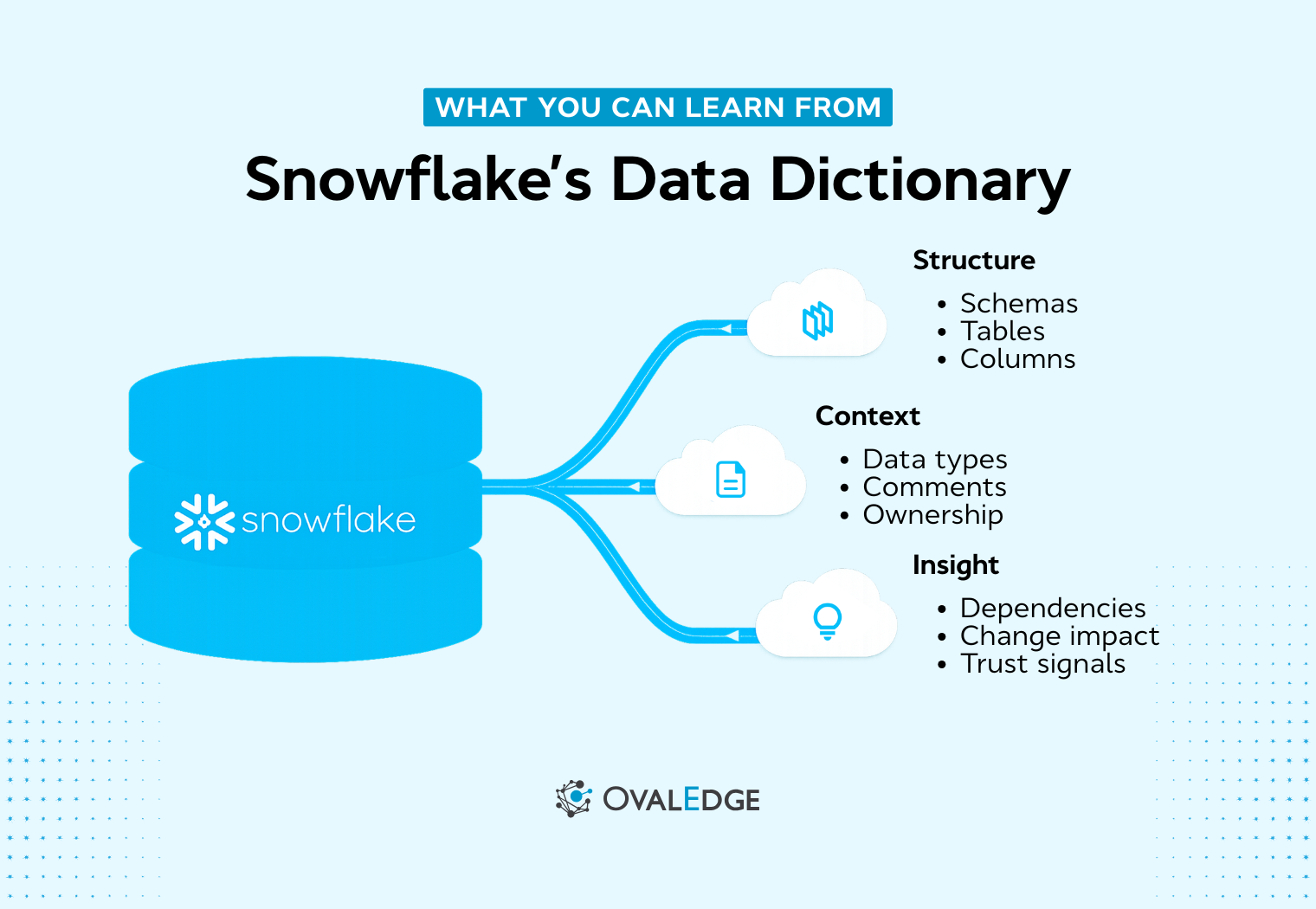
Your Snowflake environment is growing, but your visibility into it is not.
New tables appear weekly, columns change quietly, and analysts rely on tribal knowledge to understand what data means. That disconnect slows reporting, weakens governance, and makes impact analysis harder than it should be.
This is where the Snowflake data dictionary comes in. Snowflake provides built-in metadata access through INFORMATION_SCHEMA, allowing you to query tables, columns, ownership, constraints, and other structural details using standard SQL. It acts as the foundation for documentation, governance, and metadata discovery inside your warehouse.
Snowflake reported a 126% net revenue retention rate as of January 2025, which aligns with what most teams experience on the ground: more workloads, more tables, and more pressure to keep definitions consistent.
In this guide, we’ll show you how Snowflake’s data dictionary works, how to query Snowflake metadata with practical examples, what limitations to watch for, and when native capabilities are enough versus when you need a structured metadata repository.
What is a Snowflake data dictionary?
Snowflake data dictionary refers to the built-in INFORMATION_SCHEMA that exposes metadata for tables, columns, views, constraints, and data types in each database. It allows users to query system-defined views to list objects, document columns, and filter metadata by schema or object type.
Teams use it to track ownership, privileges, and usage. Snowflake natively supports capabilities such as tags, masking policies, and access history, which strengthen security and compliance within the platform. However, enterprise-grade lineage, business glossary management, and cross-system governance typically require integration with external metadata platforms.
A Snowflake data dictionary improves discovery, standardization, and secure self-serve analytics across the platform.
It provides access to:
-
Table and column names
-
Data types and nullability
-
Object ownership and creation timestamps
-
Comments and basic constraints
In simple terms, it answers the question: “What exists in my Snowflake environment, and how is it structured?”
It does not automatically provide business definitions, governance workflows, or visual lineage. But it gives you the foundation for documentation and schema metadata queries.
How Snowflake’s built-in data dictionary works
Snowflake stores metadata in system-defined views that you can query using SQL. This system catalog is called INFORMATION_SCHEMA.
Understanding INFORMATION_SCHEMA in Snowflake
INFORMATION_SCHEMA is Snowflake’s implementation of the ANSI SQL-92 system catalog. It exists at the database level and can be queried like any other table.
Common Information Schema views include:
-
INFORMATION_SCHEMA.TABLES
-
INFORMATION_SCHEMA.COLUMNS
-
INFORMATION_SCHEMA.VIEWS
Each view exposes metadata about specific object types. You query it using standard SQL; no special tooling required.
For example, when analysts ask, “How many tables exist in this schema?” the answer comes from the TABLES view. When someone needs to understand column structure, the COLUMNS view becomes essential.
INFORMATION_SCHEMA vs ACCOUNT_USAGE views
Snowflake also provides ACCOUNT_USAGE views, which serve a different purpose.
-
INFORMATION_SCHEMA provides near real-time schema metadata within a database. It supports documentation and operational use cases.
-
ACCOUNT_USAGE exposes:
-
QUERY_HISTORY
-
ACCESS_HISTORY
-
TABLE_STORAGE_METRICS
-
TAG_REFERENCES
This is critical for governance, auditing, and monitoring.
For a Snowflake schema views tutorial focused on metadata documentation, INFORMATION_SCHEMA remains the primary tool.
Snowflake also provides governance capabilities beyond INFORMATION_SCHEMA. These include tags for classifying sensitive data, masking policies to protect sensitive columns, and access history views for auditing data usage.
These features allow teams to enforce basic governance directly within Snowflake. However, managing classification, lineage, and governance workflows across large environments often requires additional metadata organization and business context.
Governance capabilities built into Snowflake
In addition to exposing metadata through INFORMATION_SCHEMA, Snowflake includes several native governance features that help teams classify, protect, and audit data within the platform. These capabilities strengthen security and compliance directly inside Snowflake.
Snowflake also supports:
-
Tags for data classification: Teams can apply tags to tables or columns to classify sensitive information such as PII or PHI. Tags help standardize how sensitive data is identified across schemas.
-
Masking policies: Masking policies dynamically protect sensitive columns based on user roles. This allows organizations to restrict visibility without duplicating or restructuring datasets.
-
Role-based access control (RBAC): Access permissions are enforced through roles, helping teams manage who can view, query, or modify specific objects within Snowflake.
-
Access history and audit views (via ACCOUNT_USAGE): Views such as ACCESS_HISTORY allow teams to monitor who accessed data and when, supporting compliance and audit requirements.
These features provide meaningful governance controls within Snowflake itself. However, they operate primarily inside the Snowflake environment. They do not centralize governance across multiple systems, manage business glossary definitions, or provide unified cross-platform lineage.
What metadata can you access using the Snowflake data dictionary?
Once you start exploring the Snowflake data dictionary through INFORMATION_SCHEMA views, you quickly realize how much structural insight is already available inside your warehouse.
At the database and schema level, you can retrieve details such as:
-
Database names
-
Creation timestamps
-
Schema ownership
-
Table types
This helps you understand how your environment is organized and who is responsible for what. For teams managing multiple business units or domains, even something as simple as knowing when a table was created or who owns a schema can remove a surprising amount of confusion.
At the table and column level, the visibility becomes even more practical. You can access:
-
Column names
-
Data types
-
Character lengths
-
Nullability rules
-
Comments
That means you can validate structure, confirm constraints, and identify where definitions may be missing. When someone asks whether a field allows null values or what data type a column uses, you do not need to search through pipelines or model files. The metadata is already there.
Beyond structure, Snowflake also exposes view definitions, basic constraints such as primary and foreign keys, and ownership or role-based access information. This makes it possible to answer questions around permissions, dependencies, and structural relationships between objects.
|
Expert insight: This kind of metadata visibility is an essential part, especially as governance becomes more common. A global survey found 71% of organizations reported having a data governance program in 2024, up from 60% in 2023, which explains why basic visibility into ownership, definitions, and access keeps moving up the priority list. |
This metadata directly supports three core outcomes:
-
Documentation becomes easier because you can systematically extract table and column details.
-
Governance improves because ownership and privileges are visible instead of implied.
-
Impact analysis becomes more reliable because object relationships and definitions are traceable.
At the same time, what you see here is primarily technical metadata. It tells you what exists and how it is structured, but not necessarily what it means to the business or how it fits into a governed workflow. That distinction becomes important as environments grow and expectations around data trust increase.
As the volume of objects expands, simply knowing what exists is no longer enough. The real challenge shifts from accessing metadata to organizing and contextualizing it in a way the entire organization can trust.
How to query the Snowflake data dictionary? (with examples)
This is where theory turns into something practical. Knowing that Snowflake exposes metadata through INFORMATION_SCHEMA is helpful, but the real value comes from learning how to query Snowflake metadata efficiently and consistently.
Let’s walk through the most common and useful patterns.
.png?width=1024&height=569&name=How%20to%20query%20the%20Snowflake%20data%20dictionary%20(with%20examples).png)
1. Querying tables' metadata using the TABLES view
The TABLES view gives you a structured list of all tables within a database. It becomes your starting point when you need to understand what exists inside a schema.
Here’s a practical example:
|
SELECT table_catalog, table_schema, table_name, table_type, created FROM my_database.INFORMATION_SCHEMA.TABLES WHERE table_schema = 'PUBLIC'; |
This query allows you to identify all tables within the PUBLIC schema, understand whether each object is a base table or a view, and see when it was created.
Teams often use this during audits, migrations, or cleanup initiatives. If you are rationalizing unused tables or validating newly deployed pipelines, this view gives you quick structural clarity without digging through models or code repositories.
In larger environments, this becomes the foundation for automated documentation or metadata extraction workflows.
2. Querying column metadata using the COLUMNS view
If the TABLES view tells you what exists, the COLUMNS view tells you how it is structured.
|
SELECT table_name, column_name, data_type, is_nullable, comment FROM my_database.INFORMATION_SCHEMA.COLUMNS WHERE table_name = 'CUSTOMERS'; |
This query reveals column names, data types, nullability rules, and any comments that have been added for documentation.
For analysts, this is often the fastest way to understand a table before building a model or writing a query. Instead of reverse-engineering structure from raw data, you can inspect the metadata directly.
For governance teams, this view supports schema validation, data quality checks, and sensitive field identification. If you are auditing which columns allow nulls or verifying whether documentation exists, this becomes your go-to query.
3. Filtering metadata by schema, database, and object type
As your Snowflake environment grows, querying metadata without filters quickly becomes noisy. Thousands of objects can overwhelm even lightweight queries.
Filtering makes your schema metadata queries far more useful.
|
SELECT * FROM my_database.INFORMATION_SCHEMA.TABLES WHERE table_schema NOT IN ('INFORMATION_SCHEMA') AND table_type = 'BASE TABLE'; |
By narrowing the scope to relevant schemas and object types, you reduce clutter and improve clarity. This is especially important in multi-team environments where production, staging, and development schemas coexist.
Filtering also ensures your metadata queries stay aligned with business intent rather than returning everything indiscriminately.
4. Performance and query optimization tips for metadata queries
Metadata queries are generally lightweight, but performance discipline still matters in shared warehouse environments.
Start by filtering at the database or schema level instead of querying across everything. Select only the columns you actually need rather than using SELECT*. Avoid unnecessary joins unless you are enriching metadata for reporting purposes.
Small optimizations like these improve responsiveness in the Snowsight interface and reduce warehouse usage when metadata queries run frequently through BI tools or scripts. Over time, these best practices support stronger analyst self-service without adding operational overhead.
At this point, you can see that Snowflake’s data dictionary is not abstract or theoretical. It is something you can query, filter, and operationalize today. However, the more you rely on INFORMATION_SCHEMA for documentation and governance, the more its boundaries become visible.
Limitations of Snowflake INFORMATION_SCHEMA
If you’ve worked with INFORMATION_SCHEMA for a while, you’ve probably felt this tension already. It gives you structured, queryable metadata. It answers technical questions quickly, but it does not solve everything.
As environments grow and more teams rely on shared data assets, the gaps become harder to ignore. Here’s where INFORMATION_SCHEMA starts to show its limits:
-
Limited historical retention. It focuses on current state metadata and does not provide deep historical tracking for structural changes over time.
-
No built-in business glossary. It tells you what a column is called and how it is structured, but not what it means in business terms.
-
Role-based visibility constraints. What you can see depends on your privileges, which can create fragmented visibility across teams.
-
No native visual lineage. You cannot automatically generate impact diagrams that show how data flows across transformations and downstream systems.
-
Difficult for non-technical users. Querying INFORMATION_SCHEMA requires SQL knowledge, which limits accessibility for business stakeholders.
|
Here’s a fact: That push for structure is not just an engineering preference. In Deloitte’s Chief Data Officer Survey, 66% of CDOs said they enabled better use of data to improve process efficiency and regulatory or legal compliance, and 63% said they improved strategic decision-making, which is hard to sustain when definitions and lineage live only in SQL queries. |
Individually, these may not seem like major obstacles. But as your Snowflake footprint expands, documentation expectations increase, and governance requirements tighten, these limitations start compounding.
At some point, metadata needs to evolve from raw system catalog entries into something structured, searchable, and collaborative. That is usually the moment when teams begin evaluating how Snowflake’s native capabilities fit into a broader metadata management strategy.
Snowflake data dictionary vs enterprise data catalogs
The Snowflake data dictionary is powerful, but it is foundational. It tells you what exists and how it is structured. It does not automatically turn metadata into governed, business-ready intelligence.
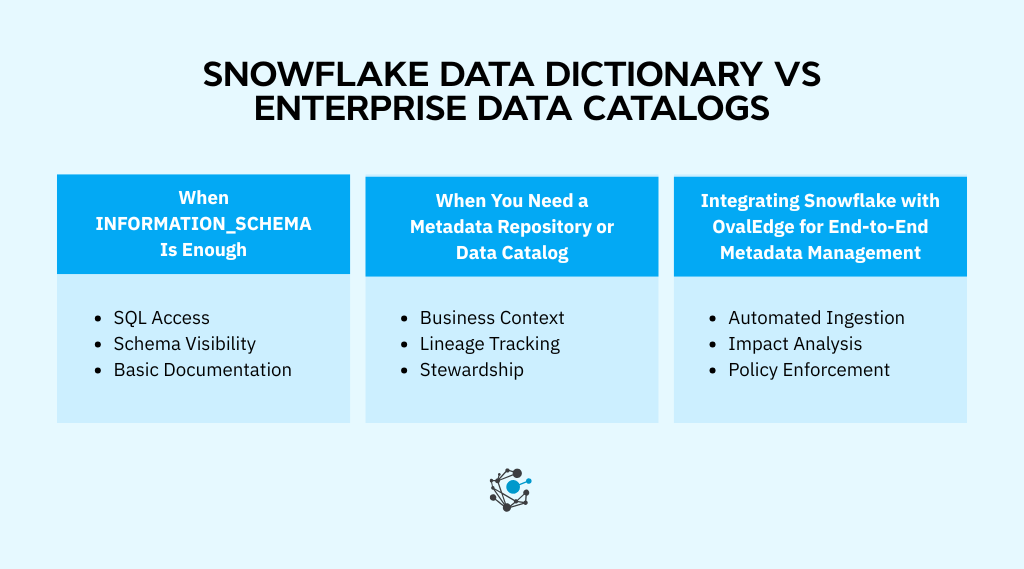
When INFORMATION_SCHEMA is enough
If you are operating with a small, engineering-led team, INFORMATION_SCHEMA often covers your needs. Developers are comfortable writing SQL. Documentation lives close to the code. Questions about structure get resolved quickly.
It also works well for ad hoc schema exploration. When someone needs to check a column type or list all tables in a schema, a quick metadata query solves the problem. Early-stage Snowflake implementations often fall into this category, where speed and flexibility matter more than formal governance.
In these environments, disciplined documentation practices combined with schema metadata queries can go a long way.
When you need a metadata repository or data catalog
As your Snowflake environment grows, so do expectations, because more teams rely on shared data assets. Business stakeholders want searchable definitions, compliance teams need traceability, and data leaders require visibility across tools, not just within Snowflake.
|
Stat: This is also why “we’ll clean up metadata later” usually does not work. Snowflake reported ~$7.9B in remaining performance obligations as of October 31, 2025, with ~48% expected within the next 12 months, which signals ongoing platform investment and expansion, not a one-time deployment. |
At this stage, additional needs start to surface:
-
Business-friendly documentation that translates technical columns into meaningful definitions
-
End-to-end data lineage tracking across pipelines and tools
-
Cross-system impact analysis when changes occur
-
Governance workflows and stewardship ownership models
System catalogs like INFORMATION_SCHEMA provide raw inputs, but they do not orchestrate governance at scale. That is where enterprise data catalogs come into play.
Platforms such as OvalEdge extend Snowflake metadata into searchable, collaborative environments. They layer business context on top of technical structure and introduce workflows that support accountability.
Integrating Snowflake with OvalEdge for end-to-end metadata management
OvalEdge takes this a step further by automatically ingesting Snowflake metadata through native connectors. It enriches structural details with business definitions, ownership models, and stewardship processes.
Beyond simple visibility, it enables lineage visualization, impact analysis, and governance automation across systems. Instead of treating metadata as static documentation, teams can actively manage it as a governed asset.
At that point, Snowflake’s data dictionary is no longer the end goal. It becomes the starting layer in a broader metadata management strategy that supports scale, trust, and long-term governance maturity.
Conclusion
You can query every table in Snowflake, list every column, and inspect data types and ownership. But if analysts still hesitate to trust definitions, if impact analysis still requires detective work, or if governance depends on manual tracking, then metadata visibility alone is not enough.
The next step is turning metadata into structured, governed, and business-aligned intelligence.
When you book a demo with OvalEdge, the process starts with connecting directly to your Snowflake environment. OvalEdge automatically ingests your metadata, organizes it into a searchable repository, and overlays business context on top of technical definitions.
You get lineage visualization across transformations, impact analysis when changes occur, and governance workflows that assign ownership and accountability. Instead of static schema documentation, you gain an operational metadata layer that supports trust at scale.
If your Snowflake environment is growing and expectations around governance are rising, this is the moment to act deliberately.

Schedule a call with OvalEdge to see how your Snowflake data dictionary can evolve into a governed, enterprise-ready metadata foundation.
FAQs
1. Is Snowflake INFORMATION_SCHEMA updated in real time?
INFORMATION_SCHEMA reflects near real-time metadata but may experience slight delays for certain operations. It is best suited for structural insights rather than audit-grade historical tracking or time-based metadata analysis across large Snowflake accounts.
2. Can Snowflake metadata be accessed across multiple databases at once?
Metadata queries must be executed at the database level. To analyze multiple databases, teams typically automate queries or consolidate metadata externally to create a centralized, cross-database metadata view.
3. Does Snowflake provide column-level data classification by default?
Snowflake does not automatically classify sensitive columns. Teams must manually tag columns or rely on external governance processes to identify PII, PHI, or regulated data elements consistently across environments.
4. How does role-based access impact metadata visibility in Snowflake?
Metadata visibility depends on user privileges. If a role lacks access to an object, its metadata may not appear in queries, which can lead to incomplete metadata results for analysts and governance teams.
5. Can Snowflake metadata be integrated with data lineage tools?
Yes. Snowflake metadata can be exported or ingested by lineage platforms that enrich it with upstream and downstream relationships, helping teams understand data movement across pipelines, transformations, and analytics layers.
6. Is INFORMATION_SCHEMA suitable for enterprise-scale metadata management?
INFORMATION_SCHEMA works well for exploration and lightweight documentation. At enterprise scale, teams often need additional layers for business context, lineage visualization, stewardship workflows, and ongoing metadata governance.
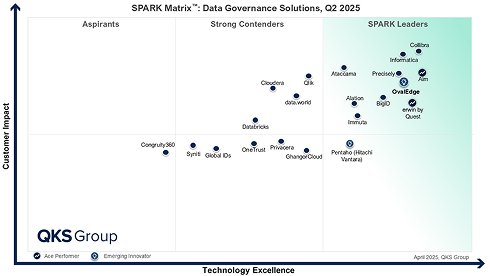
.png?width=1081&height=173&name=Forrester%201%20(1).png)
.png?width=1081&height=241&name=KC%20-%20Logo%201%20(1).png)