-1.png)
Every data-driven decision your organization makes depends on one simple factor: data quality. Yet most teams discover inconsistencies, duplicates, or missing values after data has already been loaded into analytics or governance systems.
That’s why data profiling tools have become indispensable. They examine your datasets before entering production, surfacing hidden problems, validating assumptions, and providing a clear picture of what you’re working with.
And the need for this visibility is growing fast.
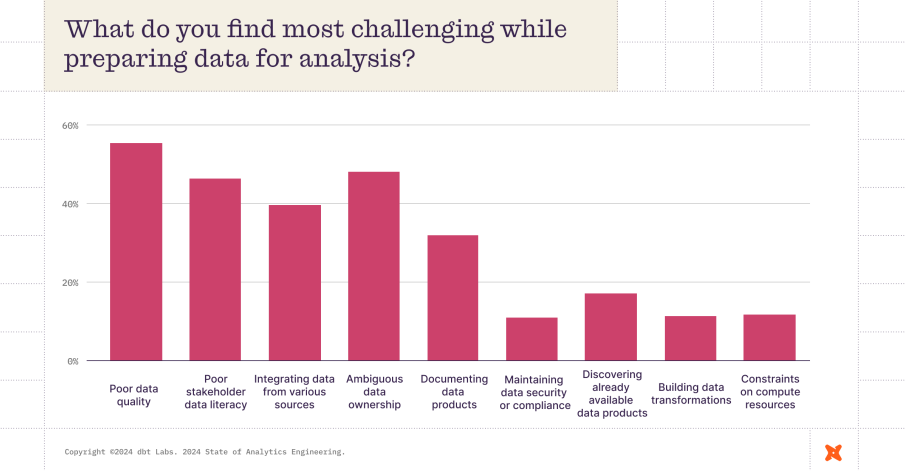
According to the 2024 State of Analytics Engineering Report, 57% of data professionals now rank poor data quality as their biggest challenge, up from just 41% two years ago.
As data stacks become more complex and governance requirements tighten, organizations can’t afford to be reactive anymore.
In this guide, we’ll explore how data profiling tools work, why they matter more than ever in 2026, and what to look for when choosing the right solution for your data ecosystem.
What are data profiling tools?
Data profiling tools are software applications designed to analyze the content, structure, and quality of datasets. They help teams understand what data they have, how clean it is, and whether it's fit for purpose, whether that’s analytics, migration, governance, or reporting.
At a basic level, these tools scan data sources (like databases, files, or cloud platforms) and generate statistical summaries:
-
What fields contain null or duplicate values?
-
Are there outliers or inconsistent formats?
-
Do the relationships between tables hold up?
Advanced profiling tools go a step further by detecting data anomalies, identifying hidden patterns, and even automating documentation. Many also integrate into ETL pipelines, allowing for continuous monitoring and real-time alerts when data quality drops.
In short, data profiling tools give you a clear, actionable view of your data landscape before you move, transform, or analyze anything.
Why do you need data profiling tools?
Data profiling is a foundational step in any reliable data management workflow. Whether you’re building a data warehouse, enforcing governance policies, or preparing for a cloud migration, profiling ensures that your data is accurate, consistent, and trustworthy.
Let’s break down the key reasons why data profiling tools matter:
1. Improving data quality early in the process
Fixing data issues after integration or analysis is time-consuming and expensive. By profiling data at the ingestion stage, you can catch problems like incomplete values, incorrect formats, or outliers, before they contaminate downstream systems. This early detection saves time and reduces rework.
2. Identifying data issues before integration or analytics
Profiling tools help spot hidden issues such as:
-
Schema mismatches between systems
-
Unexpected data types
-
Null values in critical fields
-
Inconsistent reference values
Addressing these gaps before integrating or analyzing your data ensures smoother pipelines and more accurate insights.
3. Ensuring data readiness for governance and compliance
Modern data governance relies on knowing exactly what data you have, where it resides, and whether it meets regulatory standards. Profiling tools surface metadata, enforce validation rules, and help you classify sensitive or regulated information, ensuring compliance with frameworks like GDPR, HIPAA, or CCPA.
4. Reducing risk and cost by detecting anomalies
Bad data can lead to bad decisions. Profiling tools flag anomalies like duplicated entries, format deviations, or data drift that might otherwise go unnoticed. By catching these issues early, teams can prevent costly mistakes in reporting, operations, and customer experience.
Top data profiling tools in 2026
The data profiling landscape has evolved rapidly, with tools now offering everything from automation and AI-driven insights to deep governance integrations. Below are five of the most popular and effective data profiling tools in 2026, whether you're looking for enterprise-grade capabilities or a user-friendly platform for mid-sized teams.
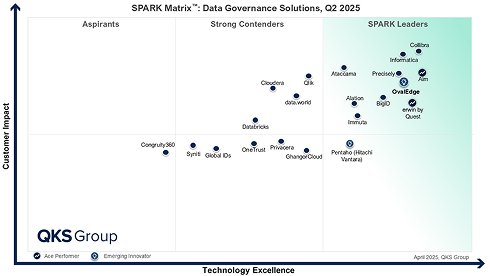
1. OvalEdge
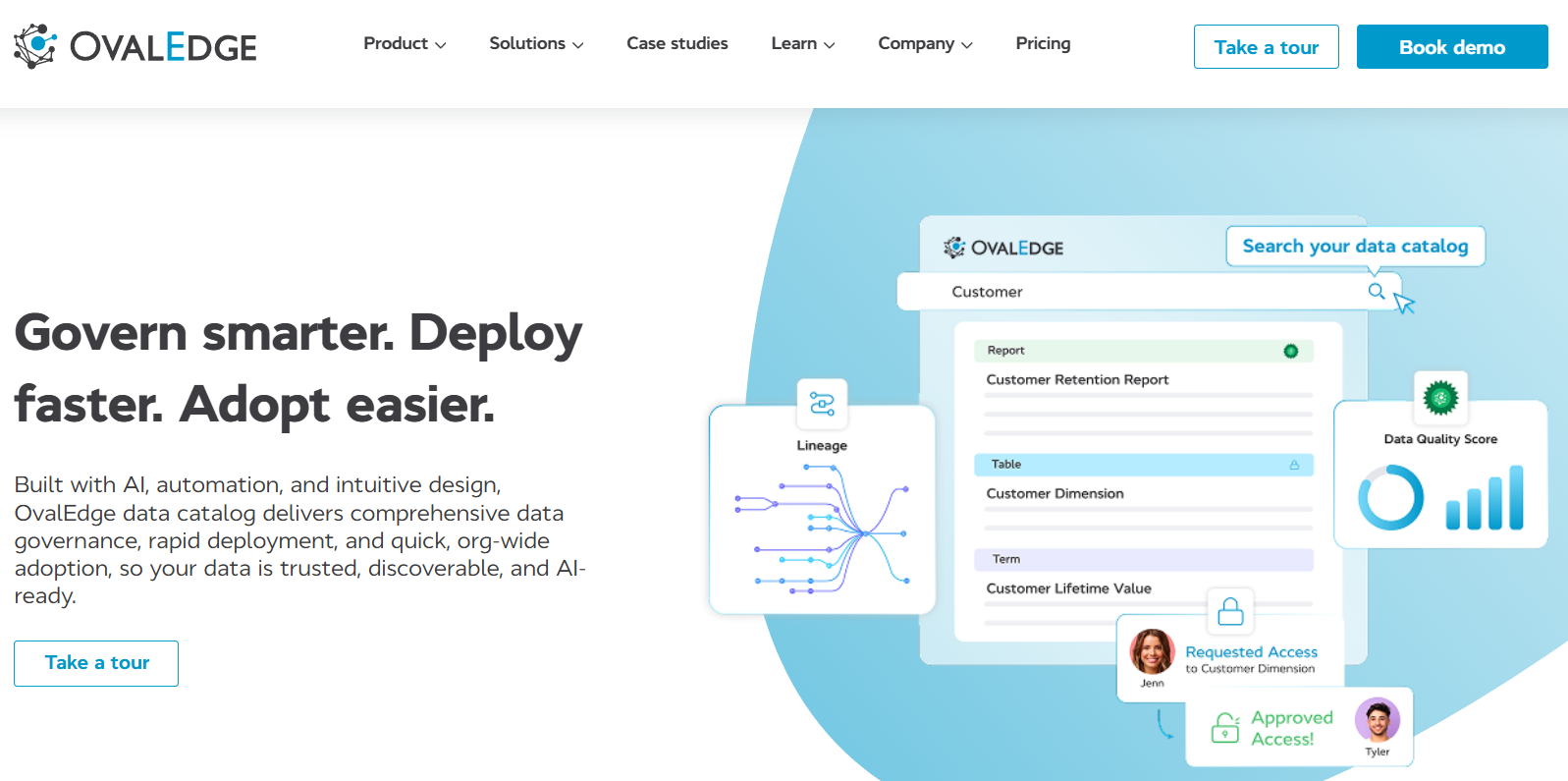
OvalEdge is a unified data governance and data catalog platform that includes a powerful, enterprise-grade data profiling engine at its core. Designed to help organizations improve data quality while maintaining strict control over compliance and access, OvalEdge brings together profiling, lineage, metadata management, and governance in one cohesive environment.
What sets OvalEdge apart is its ability to embed data profiling into every stage of the data lifecycle, not just as a one-off process, but as a continuous layer of visibility and trust across your entire ecosystem.
How it works
OvalEdge connects to your data sources, whether that’s a cloud data warehouse, relational database, or file system, and performs automated, column-level profiling. It captures key metrics like null counts, uniqueness, pattern recognition, value distributions, and outliers. These statistics are then tied back to metadata, glossary terms, and business rules, giving every stakeholder context-rich insights into what the data really looks like.
Key capabilities
-
Automated profiling at scale: Schedule profiling jobs across hundreds of datasets and sources without manual effort.
-
Embedded data lineage: See exactly how data moves from source to target, and assess the downstream impact of data issues.
-
Integrated data quality scoring: Apply business rules to assign scores and flag non-compliant records.
-
Collaboration-ready catalog: Results from profiling feed directly into the data catalog, enabling stewards, analysts, and engineers to take action together.
-
Policy-aware governance: Profiling works in tandem with access policies, masking rules, and stewardship workflows, helping you stay compliant and auditable.
When to choose ovalEdge
OvalEdge is a great fit for organizations that:
-
Need more than surface-level profiling, with deep insights into data quality, lineage, and context
-
Are you handling sensitive or regulated data (e.g., under GDPR, HIPAA, or internal compliance frameworks)
-
Want to embed profiling into broader data governance and cataloging workflows
-
Operate mid- to large-sized data teams with both technical and non-technical users
-
Prefer a user-friendly interface that supports collaboration across engineering, analytics, and stewardship roles
-
Are building a culture of data ownership and trust across departments
If that sounds like your organization, it's worth exploring how OvalEdge can streamline your data quality and governance efforts. Book a free demo to see it in action.
2. Informatica
Informatica is a long-established leader in the data management space, and its data profiling capabilities are built into its broader Data Quality and Data Integration platforms. Designed for complex enterprise environments, Informatica offers powerful profiling features that are tightly integrated into its end-to-end data lifecycle tools.
Key features
-
Comprehensive profiling for structured and semi-structured data sources
-
Custom rule creation for profiling metrics and validations
-
Interactive dashboards to visualize data patterns, anomalies, and completeness
-
Integration with ETL and MDM workflows, making it easier to embed profiling into your data pipelines
-
Scalable architecture for profiling large data volumes across hybrid cloud setups
Why it’s a standout tool
Informatica’s biggest strength lies in its enterprise-grade scalability and ability to manage data across disparate systems. The profiling engine is highly customizable, enabling users to define rules, monitor thresholds, and set up alerts tailored to their data quality goals.
3. Talend
Talend is a popular choice for organizations seeking a flexible, open-source–friendly platform for data integration and profiling. With tools like Talend Open Studio and Talend Data Fabric, it offers powerful profiling capabilities that are deeply embedded into the ETL workflow, enabling teams to analyze data quality as part of their day-to-day operations.
Key features
-
Built-in data profiling across various data sources (databases, cloud, APIs, flat files)
-
Real-time data quality checks during integration and transformation
-
Customizable profiling metrics for identifying nulls, patterns, duplicates, and outliers
-
Open-source support through Talend Open Studio, with premium enterprise features in Talend Data Fabric
-
Visual, low-code environment for setting up and automating profiling workflows
Why it’s a standout tool
What makes Talend stand out is its blend of accessibility and scalability. Smaller teams can start with the free, open-source version to get basic profiling up and running, while larger enterprises can scale into more advanced governance and data quality features.
4. Dataedo
Dataedo is a lightweight, user-friendly data documentation and profiling tool designed to help organizations understand, catalog, and improve their data assets. It focuses on making metadata and profiling insights accessible to both technical and non-technical users, making it a favorite among mid-sized teams and data stewards who need visibility without the overhead of a complex platform.
Key features
-
Column-level profiling, including nulls, distinct values, min/max, and pattern detection
-
Interactive data dictionaries that document schema, descriptions, and business rules
-
ER diagrams and relationship mapping to visualize data structures
-
Support for multiple databases like SQL Server, Oracle, MySQL, Snowflake, and more
-
Simple UI and lightweight deployment that doesn’t require infrastructure-heavy setup
Why it’s a standout tool
Instead of overwhelming users with too many options, it provides exactly what teams need to profile, understand, and share data insights. It’s ideal for companies that want to build a strong data culture with minimal friction.
5. Ataccama
Ataccama is an AI-powered platform that brings together data profiling, data quality, master data management, and governance into a single solution. Built for large enterprises, Ataccama is known for its ability to scale profiling across complex data environments while leveraging automation and machine learning to accelerate data quality initiatives.
Key features
-
AI-assisted data profiling that detects patterns, anomalies, and quality issues automatically
-
Comprehensive metadata discovery, including relationships, joins, and data lineage.
-
Data quality scorecards to track compliance and improvement over time
-
Tight integration with governance and stewardship workflows
-
Support for hybrid environments, including cloud platforms, databases, data lakes, and APIs
Why it’s a standout tool
Automating much of the heavy lifting in data profiling and blending it seamlessly with governance processes, Ataccama helps enterprises move faster without sacrificing control or accuracy.
Key capabilities & features of data profiling tools
While every tool offers its own mix of features, the core purpose of any data profiling solution is the same: to help you understand your data before you act on it. The best tools go beyond simple metrics and offer deeper insights, automation, and integration capabilities that make profiling a continuous, value-driving process.
Let’s break down the essential capabilities that matter most:
1. Structure discovery (Schema, Metadata, Formats)
At the foundation of data profiling is understanding how your data is structured. Tools in this category can:
-
Detect and document schema elements (tables, columns, data types)
-
Capture metadata like field lengths, formats, and constraints
-
Surface structural inconsistencies, such as missing fields or type mismatches
Structure discovery is especially important during data migration, integration, and governance setup, where aligning schemas is critical to system compatibility.
2. Content discovery (Values, Distributions, Anomalies)
Beyond structure, profiling tools dive into the actual content of your data. They help you:
-
Analyze statistical summaries (mean, median, min/max)
-
Identify nulls, blanks, or duplicate values
-
Spot outliers, skewed distributions, and pattern mismatches
This kind of content-level insight is crucial for analytics teams, data scientists, and quality assurance workflows, ensuring that datasets reflect real-world behavior.
3. Relationship discovery (Keys, Joins, Dependencies)
Data doesn’t exist in silos. Leading profiling tools detect and visualize:
-
Primary and foreign key relationships
-
One-to-one, one-to-many, and many-to-many joins
-
Cross-table dependencies and inherited values
This is essential for building reliable data models, enforcing referential integrity, and enabling complex queries or transformations without data loss or duplication.
4. Automation, reporting & integration (ETL, Monitoring)
Modern data profiling tools go beyond one-time analysis. They offer:
-
Scheduled profiling jobs that run automatically as new data flows in
-
Pre-built reports and dashboards for tracking data quality over time
-
Integrations with ETL platforms, data catalogs, and monitoring tools for a unified workflow
These features ensure that profiling isn’t a manual task; it becomes part of a continuous, automated data management process.
How to select the best data profiling tool: 5 actionable steps
Choosing the right data profiling tool isn’t just about ticking feature boxes; it’s about aligning the tool with your business goals, data ecosystem, and team capabilities. Here's a step-by-step framework to help you make a confident, future-proof decision.
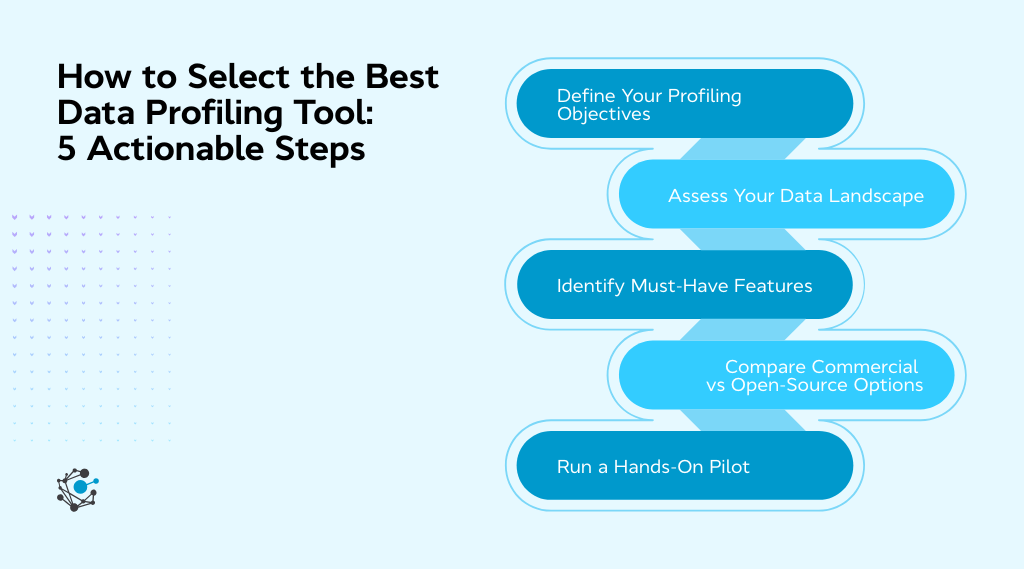
Step 1: Define your data profiling objectives
Start by identifying why you need a data profiling tool in the first place. Is your primary goal to improve data quality, support governance, validate data before migration, or monitor real-time pipelines? The clearer your objective, the easier it becomes to filter tools that match your actual needs.
Take action:
-
Write down your top 3 goals for implementing data profiling (e.g., anomaly detection, compliance readiness, migration prep).
-
List the stakeholders who need to use the tool: data engineers, analysts, stewards, or business users.
-
Decide whether profiling is a one-time task or an ongoing process in your workflow.
Step 2: Assess your current data landscape
The right tool must fit seamlessly into your existing data infrastructure. That means it should support your primary data sources, handle your volume of data, and integrate with your ETL, BI, or governance stack. Without this alignment, even the best tools will create bottlenecks.
Take action:
-
Inventory your current data sources (databases, files, cloud platforms, APIs).
-
Estimate your average and peak data volume to understand scalability needs.
-
Map out where profiling fits in your workflow, before ETL, during integration, or in your data catalog?
Step 3: Identify must-have features
Once you know your goals and technical environment, it’s time to prioritize features. For example, do you need automation, anomaly detection, metadata enrichment, or support for non-relational data? This step helps avoid feature bloat and ensures you're investing in capabilities you’ll actually use.
Take action:
-
List your top 5 non-negotiable features (e.g., real-time profiling, multi-source support, automated reports).
-
Decide how important UI/UX is. Will business users need to access it, or just technical teams?
-
Check if the tool supports integration with tools you already use (e.g., Snowflake, Power BI, OvalEdge).
Step 4: Compare commercial vs open-source options
Open-source tools offer flexibility and cost savings, while commercial platforms bring scalability, support, and faster onboarding. The right choice depends on your budget, in-house expertise, and how quickly you need results. Evaluate based on total cost of ownership, not just license price.
Take action:
-
Explore 1–2 open-source tools and 1–2 commercial tools and note their pros/cons.
-
Factor in the internal resources you'll need for setup, training, and maintenance.
-
Reach out to vendors for demos or request a free trial environment.
Step 5: Run a hands-on pilot before you commit
Before finalizing a tool, run a short pilot with real data and real users. This lets you test performance, usability, and integration without a full rollout. You’ll quickly see whether the tool delivers on its promises and fits your workflow in practice, not just in theory.
Take action:
-
Choose a sample dataset and define a clear use case for the pilot (e.g., profiling customer records pre-ETL).
-
Involve both technical and non-technical users in the test and gather feedback.
-
Use a scorecard to rate the tool on ease of use, accuracy, speed, and integration.
|
Common mistakes to avoid during selection
|
Conclusion
Choosing the right data profiling tool is no longer optional; it’s a critical part of building a trustworthy, scalable, and efficient data ecosystem. Whether you're trying to improve data quality, support compliance, or prepare for data transformation initiatives, profiling gives you the visibility and control you need before problems arise downstream.
In 2026, the best tools do more than just generate statistics; they integrate seamlessly into your workflows, automate repetitive checks, and surface insights that help your team act faster.
If you're looking for a platform that combines automated profiling, governance integration, and metadata intelligence in one unified experience, OvalEdge is built for that exact purpose. It empowers both technical and business teams to trust their data, take action faster, and meet compliance standards with ease.
Ready to see how OvalEdge fits into your data quality strategy? Book a free demo and explore how profiling can become a proactive part of your data lifecycle.
FAQs
1. What is the difference between data profiling and data quality assessment?
Data profiling focuses on analyzing the structure, content, and relationships within a dataset. It helps you understand what’s in your data. Data quality assessment, on the other hand, evaluates whether the data meets specific quality standards like accuracy, completeness, and consistency. Profiling often feeds into quality assessment by identifying issues upfront.
2. Can data profiling tools detect data anomalies automatically?
Yes. Many modern profiling tools use built-in logic or machine learning to detect anomalies such as:
-
Outliers and unexpected values
-
Missing or duplicate records
-
Pattern mismatches (e.g., invalid formats)
Tools like OvalEdge offer automated anomaly detection as part of their profiling capabilities.
3. Are open-source data profiling tools as effective as commercial ones?
Open-source tools like Talend Open Studio can be very effective, especially for teams with strong technical skills. However, they may lack advanced features like automation, real-time profiling, or integrated governance. Commercial tools provide more out-of-the-box capabilities, support, and scalability, making them better suited for enterprise use cases.
4. Do data profiling tools support real-time data analysis?
Some advanced tools do. Real-time or near-real-time profiling is typically used in streaming environments or continuous data pipelines. While not all tools offer it, platforms like Talend and OvalEdge support automated, scheduled profiling that keeps your data insights current.
5. How often should I run data profiling?
Ideally, data profiling should be an ongoing process. Best practice is to:
-
Run profiling at ingestion or during ETL
-
Schedule regular profiling jobs for key datasets
-
Profile new data sources before integration or analysis
Many tools allow you to automate these checks to maintain continuous data quality.
6. Do I need technical expertise to use a data profiling tool?
Not necessarily. While some tools are built for data engineers, many modern platforms, including OvalEdge, offer intuitive interfaces and guided workflows that make data profiling accessible to analysts, stewards, and even business users. Look for tools with strong documentation and visual dashboards if ease of use is a priority.
.png?width=1081&height=173&name=Forrester%201%20(1).png)
.png?width=1081&height=241&name=KC%20-%20Logo%201%20(1).png)