-1.png)
Every data cleaning tool can find duplicates and fix formats. What separates them is what happens after the cleanup, when definitions, ownership, and lineage decide whether the fix holds.
The nine best data cleaning tools for 2026 fall into four groups: enterprise data quality platforms, AI-powered data cleansing software, self-service preparation tools, and lightweight cleaners. The right pick depends on whether the cleaning is a one-off analytical job or a governed, automated pipeline that runs at scale.
This guide compares all nine by automation, governance, and compliance. A comparison table, quick picks, and a decision framework help you shortlist in minutes.
What are the 9 best data cleaning tools?
The nine best data cleaning tools are split into four groups by the job each is built for:
-
Enterprise data quality platforms (OvalEdge, Informatica Data Quality, IBM InfoSphere QualityStage)
-
Self-service preparation tools (Talend Data Preparation, Trifacta by Alteryx, Microsoft Power Query)
-
Lightweight cleaners (OpenRefine)
-
AI-powered cleansing software (Ataccama ONE, WinPure Clean & Match)
|
Tool |
Best for |
Reusable rules & automation |
AI / no-code cleansing |
Profiling + validation depth |
|
OvalEdge |
Enterprise teams where cleaning has to run inside a governed foundation (catalog, glossary, lineage, ownership), not as a standalone job |
Governed rules tied to owners and definitions, applied continuously across systems |
Low-code interface with AI-assisted rule suggestions |
Profiling, cleansing, validation, and lineage in one platform |
|
Informatica Data Quality |
Large regulated enterprises with mature governance programs |
Enterprise rule library, applied across large distributed pipelines |
Technical UI with some AI-assisted matching |
Advanced profiling with pattern and anomaly detection, matching across systems |
|
IBM InfoSphere QualityStage |
Batch-based quality inside IBM-centric data stacks |
Configurable matching and survivorship rules for high-volume batch runs |
Technical UI, limited AI, needs specialist skills |
Entity resolution and standardization at high volume |
|
Talend Data Preparation |
Analyst-led preparation with reuse across teams |
Shareable preparation logic reused across analysts, batch-focused |
Low-code visual editor with AI-assisted suggestions |
Visual profiling during preparation, surfaced inline |
|
Trifacta (by Alteryx) |
BI and ML data preparation at scale |
Reusable recipes for repeatable transformations at scale |
Low-code visual wrangling for analysts and data scientists |
Profiling insights shown during transformation |
|
Microsoft Power Query |
Microsoft-native teams already in Excel or Power BI |
Reusable queries inside a workbook or report, hard to enforce across teams |
Low-code visual editor inside Excel and Power BI |
Basic column profiling and quality stats |
|
OpenRefine |
One-off, exploratory cleanup and text transformation |
Manual, per-session cleanup with no automation between runs |
Code-optional interface with AI-assisted clustering |
Interactive profiling and clustering for exploratory work |
|
Ataccama ONE |
AI-assisted cleansing tied to governance, lineage, and MDM |
AI-suggested rules with continuous anomaly monitoring |
Low-code interface with AI-assisted rule creation and monitoring |
Profiling, quality monitoring, MDM, and lineage in one platform |
|
WinPure Clean & Match |
CRM and contact data cleaning without engineering support |
Reusable projects for batch cleaning and matching |
No-code interface with AI-assisted fuzzy matching |
Cleansing and matching focus, lighter on profiling |
1. OvalEdge
Disclaimer: We have evaluated OvalEdge against the same criteria as every other tool below.
OvalEdge is a unified data governance platform where cleaning is one capability inside the Enterprise Context Graph, the same governed layer that carries metadata, lineage, glossary, and ownership. Every cleaned value inherits that context automatically, so when a dashboard, a model, or an audit depends on it months later, the fix still traces back to the rule that made it and the person who approved it.
How it handles repeatable cleaning
Every cleaning rule is tied to a business definition, a policy, and an accountable owner. Rules run continuously across source systems, so a value cleaned on Monday still traces back to its rule and owner six months later. Schema changes and new system onboards do not break existing rules because they are bound to the business definition, not a specific table or column.
Rules also cascade through lineage, so a standardization on a source field automatically covers every downstream table, report, and model.
How it profiles, cleanses, and validates
All three run on the same metadata layer, which is what makes lineage back to source possible. Profiling surfaces duplicates, missing values, and broken relationships, then routes issues to owners. Validation rules flag, quarantine, or block records missing thresholds measured against the six standard data quality dimensions. Because profiling and validation share context with the catalog, a flagged record already carries its owner, classification, and downstream dependencies before a steward even opens the issue.
AI, automation, and who runs the tool
OvalEdge keeps stewards in control while three built-in agents handle the repetitive discovery and rule-building work behind the scenes.
-
Interface: rules built visually or in a rule builder; stewards without SQL can review, approve, and reassign issues from the same UI.
-
AI: the Rule Building Agent recommends cleansing rules, the Legacy Debt Identifying Agent flags duplicates and reference mismatches, and the Owner/Steward Assignment Agent surfaces likely owners for unclaimed data. Every recommendation shows the datasets it would affect before a reviewer approves it.
-
No-code: every suggested rule is approved by a human owner before it runs. Approved rules enter the same continuous pipeline as manually created ones, with full audit trail from suggestion through execution.
Where it fits and where it doesn't
Built for enterprises where governance is a named function, not a side responsibility.
-
Fits: organizations running analytical AI (churn analysis, forecasting, fraud detection, risk scoring) where the same governed data has to feed regulated reporting and AI initiatives without parallel versions of the truth.
-
Doesn't fit: teams that only need a lightweight, standalone cleaner. Cleaning sits inside a broader governance suite (catalog, lineage, access, glossary).
Book a demo to see how a cleaning rule traces back to its owner, policy, and business definition across every downstream dashboard and model, all from one governed layer.
Also read: OvalEdge Academy: your governance rollout, guided end-to-end
2. Informatica Data Quality
Informatica Data Quality profiles, cleanses, standardizes, and validates data across large distributed environments, with stewardship workflows and compliance-ready processes built for enterprises that already run governance as a formal program.
How it handles repeatable cleaning
Cleaning rules are defined once in a central rule library and applied across every pipeline. Rule ownership and history are tracked, so a rule written three years ago is still explainable today. The same ruleset holds whether the pipeline touches one system or one hundred.
How it profiles, cleanses, and validates
Profiling leads with pattern detection, anomaly detection, and column-level statistics that surface issues before rules are written. Cleansing covers standardization, deduplication, and enterprise-scale entity resolution across customer, product, and vendor records. Validation rules flag, quarantine, or reject records that fail thresholds, configurable per data domain.
AI, automation, and who runs the tool
Informatica is a technical tool by design, built for engineers rather than analysts:
-
Interface: assumes SQL and data modeling familiarity.
-
AI: present in matching and rule suggestion, secondary to the manual rule library.
-
No-code: business users interact through stewardship workflows (approving matches, resolving flagged records), not by writing rules directly.
Where it fits and where it doesn't
Built for large regulated enterprises.
-
Fits: financial services, healthcare, pharmaceuticals, and government with mature governance programs.
-
Doesn't fit: mid-market teams or organizations without dedicated data quality specialists. Implementation is heavy; time to first value measured in quarters.
3. IBM InfoSphere QualityStage
IBM InfoSphere QualityStage cleanses, standardizes, and matches data in large-scale batch environments, centered on entity resolution and standardization inside IBM-native data stacks.
How it handles repeatable cleaning
QualityStage keeps cleaning repeatable through three controls built for high-volume batch runs. Rules can be versioned and rolled back if a change breaks something downstream. The same ruleset applies on every scheduled load, and survivorship logic built into matching rules keeps the surviving record deterministic.
How it profiles, cleanses, and validates
Cleansing and matching happen in-tool, with profiling picked up by a separate IBM product. Cleansing covers standardization for names, addresses, reference codes, and product data, with locale-specific rulesets out of the box. Matching resolves duplicates across systems that were never designed to talk.
AI, automation, and who runs the tool
QualityStage is a technical tool where control matters more than automation:
-
Interface: configured by data engineers and information architects familiar with IBM DataStage.
-
AI: matching uses probabilistic and deterministic techniques, without ML-suggested rules.
-
No-code: stewards interact through review workflows rather than by building rules directly.
Where it fits and where it doesn't
Built for the IBM stack. Outside it, the fit weakens quickly.
-
Fits: large enterprises already running DataStage, Db2, or Cognos that need reliable batch-based quality enforcement.
-
Doesn't fit: non-IBM environments (connectors, integration, and support all optimize for the IBM stack), teams without specialists, or real-time and streaming use cases.
4. Talend Data Preparation
Talend Data Preparation, now part of Qlik, lets analysts clean, profile, and enrich data interactively for analytics and reporting, with the option to hand cleaned datasets into broader Talend pipelines for operational use.
How it handles repeatable cleaning
Preparation logic is saved as reusable recipes that analysts can share and rerun on new or refreshed data. Reuse works well within an analytics team, but enterprise-wide enforcement is thinner than a dedicated data quality platform; Talend is analyst-first, governance-second.
How it profiles, cleanses, and validates
Talend's design center is fast to prepare, with profiling surfaced inline as the analyst works, missing values, format inconsistencies, and pattern anomalies show up during the recipe build. Cleansing covers standardization, deduplication, and enrichment. Validation is available but shallower than dedicated data quality platforms.
AI, automation, and who runs the tool
It is low-code by design, with AI speeding up preparation rather than automating quality decisions:
-
Interface: visual recipe steps, operable without SQL.
-
AI: suggests likely next transformation steps based on data shape, and recommends functions automatically.
-
No-code: yes, for analysts and business users on preparation work.
Where it fits and where it doesn't
It fits analytics teams doing fast, reusable preparation, and falls short when enforcement needs to hold across the whole organization:
-
Fits: analytics and business teams doing fast, visual preparation with reuse across analysts, especially on recurring reports.
-
Doesn't fit: teams needing governed, always-on cleaning across production pipelines; enforcement across the whole organization is harder than reuse within a team.
5. Trifacta by Alteryx
Trifacta, now part of Alteryx, is a visual data wrangling platform for preparing data for analytics and machine learning, with iterative transformation and profiling supported at cloud scale.
How it handles repeatable cleaning
Trifacta uses reusable recipes that are versionable, shareable, and rerunnable on refreshed data. Reuse is strong inside data science and BI teams. Enterprise enforcement is lighter than a full data quality platform; reuse works better than governance across the wider organization.
How it profiles, cleanses, and validates
Trifacta earned its reputation as a wrangling tool, not a cleaning platform. Profiling shows inline column stats, distributions, and quality flags as the analyst works. Cleansing covers standardization, deduplication, and structural fixes. Validation is rule-based within a recipe rather than platform-wide.
AI, automation, and who runs the tool
Trifacta is low-code with AI accelerating exploratory cleanup, and every transformation is analyst-approved before it applies:
-
Interface: visual wrangling for analysts and data scientists without heavy SQL.
-
AI: suggests likely next transformation steps to speed up iterative cleanup on unfamiliar datasets.
-
No-code: yes, for the wrangling workflow. Every transformation is analyst-approved before it applies.
Where it fits and where it doesn't
Trifacta fits data science and BI teams preparing large messy datasets, and falls short where governance and continuous enforcement matter:
-
Fits: analytics and data science teams preparing large, messy datasets for BI, advanced analytics, and ML; retail, media, marketing analytics, any domain where raw data shape changes often.
-
Doesn't fit: teams needing continuous, governed cleaning across production pipelines. Licensing costs also scale meaningfully with data volume and users at enterprise scale.
6. Microsoft Power Query
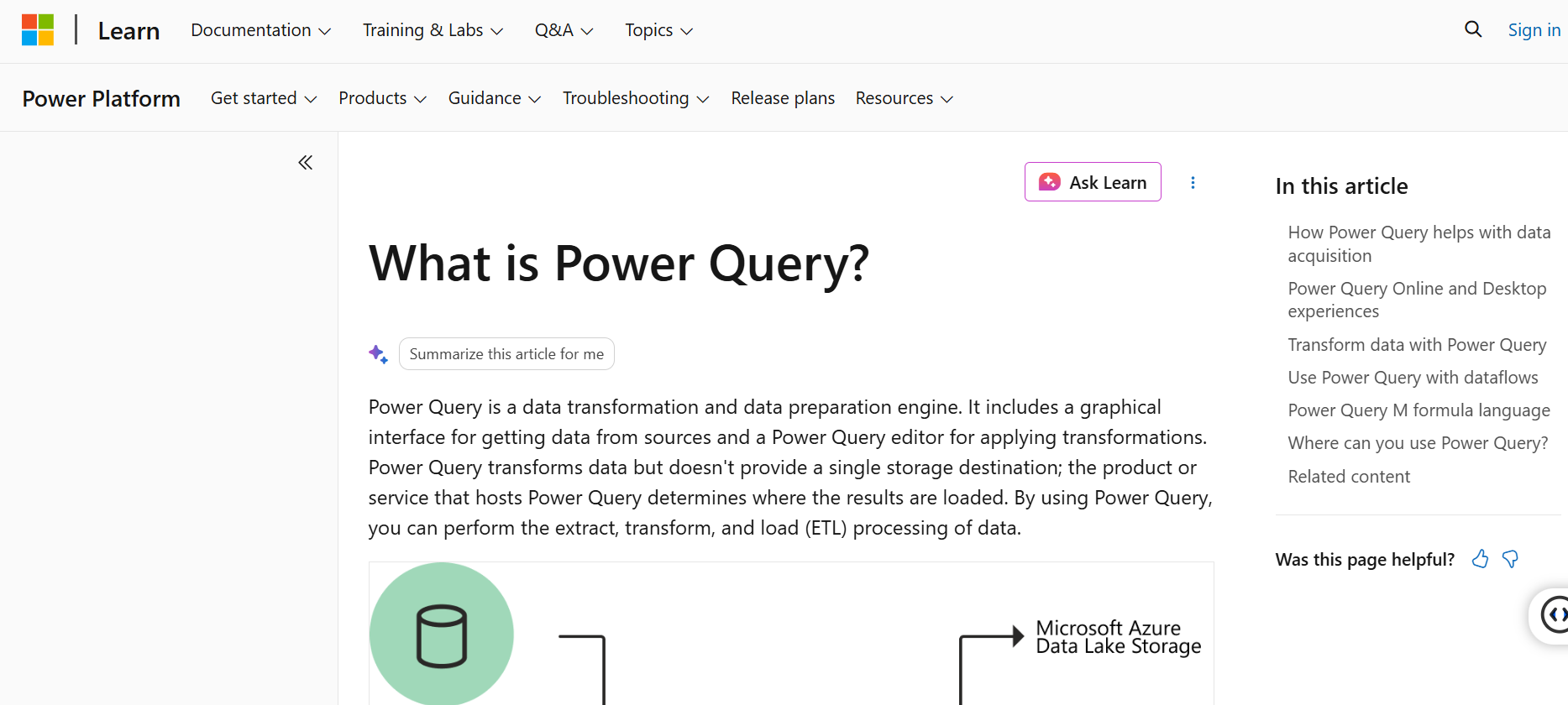
Power Query is an embedded data preparation tool available across Excel, Power BI, and other Microsoft products, focused on lightweight cleaning and transformation for individual analysts and small teams.
How it handles repeatable cleaning
Queries are saved inside a workbook or Power BI report and rerun on refreshed data. In-file reuse works well. Cross-file, logic tends to get rewritten, and enforcing consistent cleaning across a team is hard without additional tooling like dataflows or Fabric.
How it profiles, cleanses, and validates
Power Query covers profiling and cleansing at the individual analyst level. Column statistics, quality distribution, and value distribution surface inline in the editor. Cleansing covers standardization, deduplication, and format fixes. Validation is minimal; Power Query shapes data for a specific report, not for downstream enforcement.
AI, automation, and who runs the tool
Power Query is low-code by design, with AI features aimed at individual analysts rather than team-wide automation:
-
Interface: visual editor most Excel and Power BI users can operate without training.
-
AI: column-from-example (infers a transformation from a sample) and some data type auto-detection.
-
No-code: yes, for individual analyst work. Doesn't automate quality across a team.
Where it fits and where it doesn't
Power Query fits Microsoft-native individual analysts, and gets outgrown at team scale where enterprise standards need to hold:
-
Fits: Microsoft-native teams and individual analysts already in Excel, Power BI, or Fabric.
-
Doesn't fit: teams needing enterprise standards enforced across production pipelines. Queries duplicate across files and diverge over time.
7. OpenRefine
OpenRefine is an open-source desktop tool for exploratory data cleaning and text transformation, best suited to one-off cleanup, pattern-based corrections, and messy text where a full platform would be overkill.
How it handles repeatable cleaning
OpenRefine works on one dataset at a time, with reuse handled manually through exported operation histories that can be reapplied to similar datasets. There's no scheduling and no rule library across projects; repeatability depends on the analyst remembering to apply the exported history.
How it profiles, cleanses, and validates
OpenRefine shines on messy text and inconsistent free-form data. Interactive facets, clusters, and text filters let the analyst inspect data shape fast. Clustering algorithms group similar values (name variants, address variants) which the analyst merges or corrects. Validation is manual; no built-in rule enforcement.
AI, automation, and who runs the tool
OpenRefine's interface is code-optional, and its clustering uses string similarity rather than modern machine learning:
-
Interface: most transformations through the visual UI. Advanced users can drop into GREL or Jython.
-
AI: clustering uses string similarity and phonetic techniques, which is why it works on messy text without needing training data.
-
No-code: works for the standard workflow; the visual UI covers most cleanup without touching code.
Where it fits and where it doesn't
It fits exploratory cleanup on messy text, and falls short of anything resembling enterprise readiness:
-
Fits: researchers, journalists, small teams, and analysts handling one-off cleanup on messy, mostly text datasets where flexibility matters more than scale.
-
Doesn't fit: enterprise readiness (no governance, no automation, no team collaboration, no continuous pipelines). Data has to fit in memory on the analyst's machine.
8. Ataccama ONE
Ataccama ONE is an AI-powered data quality platform covering profiling, cleansing, observability, and lineage. It targets enterprises where AI-assisted cleansing and continuous monitoring need to sit alongside governance and master data.
How it handles repeatable cleaning
The ONE AI Agent suggests cleansing rules based on data shape and history, and rules run continuously against source systems once a human approves them. Anomaly detection catches drift before it reaches downstream systems, and every rule is versioned so changes in logic stay traceable.
How it profiles, cleanses, and validates
Ataccama runs profiling, quality monitoring, MDM, and lineage on one platform, which is its core architectural claim. Profiling insights inform quality rule suggestions. Cleansing covers standardization, deduplication, and validation at enterprise scale. Validation is tied to lineage, so a quality signal at the report layer traces back to source.
AI, automation, and who runs the tool
AI and no-code are Ataccama's strongest externally-recognized capabilities, with human approval required before recommendations run:
-
Interface: low-code with an AI-assisted rule builder.
-
AI: the ONE AI Agent recommends cleansing rules, monitors quality continuously, and explains data reliability in natural language.
-
No-code: yes for rule review and steward workflows. Recommendations are approved before they run.
Where it fits and where it doesn't
Ataccama fits enterprises where quality issues have downstream regulatory or customer impact, and its scope makes it heavy for mid-market teams:
-
Fits: financial services, telecommunications, insurance, and any domain where quality issues have downstream regulatory or customer impact.
-
Doesn't fit: mid-market teams. Onboarding is heavy; platform surface area is broad for teams that only need standalone cleaning.
9. WinPure Clean & Match
WinPure Clean & Match is a no-code, on-premises tool for cleaning, deduplicating, and matching customer and contact data from CRM, ERP, and spreadsheet sources, with AI-assisted fuzzy matching that catches duplicates that exact matching misses.
How it handles repeatable cleaning
Cleaning and matching logic is saved as projects that can be rerun on new exports from the same source systems. Reuse works well for recurring CRM cleanup workflows. Continuous execution isn't the design center; WinPure runs on demand, not always-on.
How it profiles, cleanses, and validates
Cleansing is where WinPure focuses, with profiling and validation kept lighter to match its contact-data scope. Cleansing covers standardization, deduplication, fuzzy matching, and address verification against official postal databases. Profiling is basic. Validation is lighter than dedicated data quality platforms.
AI, automation, and who runs the tool
WinPure is fully no-code, with AI fuzzy matching catching near-duplicates that exact matching misses:
-
Interface: no-code, guided workflow for profiling, cleaning, matching, and merging.
-
AI: fuzzy matching detects near-duplicates across names, addresses, and contact fields (Bob Smith vs Robert Smith, 123 Main St vs 123 Main Street).
-
No-code: yes. Business and operations users run WinPure without engineering support.
Where it fits and where it doesn't
It fits marketing, sales, and operations teams cleaning contact data, and falls short of always-on production pipelines and enterprise-wide scope:
-
Fits: marketing, sales, and operations teams cleaning customer and contact data without engineering support. Smaller and mid-market organizations, agencies handling client CRM cleanup.
-
Doesn't fit: teams needing always-on cleaning across production pipelines, or enterprises with the full range of data types beyond contact data.
Nine tools, three very different jobs. Enterprise platforms run governed cleaning at scale, self-service tools give analysts fast preparation, and lightweight tools handle one-off cleanup.
Most enterprise teams use more than one over time, and the real decision is rarely the tool's feature list. It is whether the cleaning a tool produces holds up as more dashboards, models, and AI initiatives come to depend on the same data. Teams that build cleaning rules only after something breaks end up fixing the same quality issues every quarter. The five-step process below explains how cleaning actually works, and the decision framework that follows helps match the tool to the job.
How to clean data: a 5-step process
Cleaning at any real scale follows the same five steps whether it runs manually in a notebook or continuously on an enterprise platform: remove duplicates, fix structural errors, filter outliers, handle missing values, and validate what's left. The tool decides who runs them, how often, and how much of the work comes off human hands.
Here’s a full walkthrough of each step and where teams usually get stuck; see our guide on data cleaning techniques.
OvalEdge expert insight: In OvalEdge, all five steps run continuously against source systems, with each rule tied to an owner, a definition, and a lineage trail back inside the Enterprise Context Graph. That is the difference between cleaning as a project and cleaning as a governed capability.
How to choose the right data cleaning tool for your use case
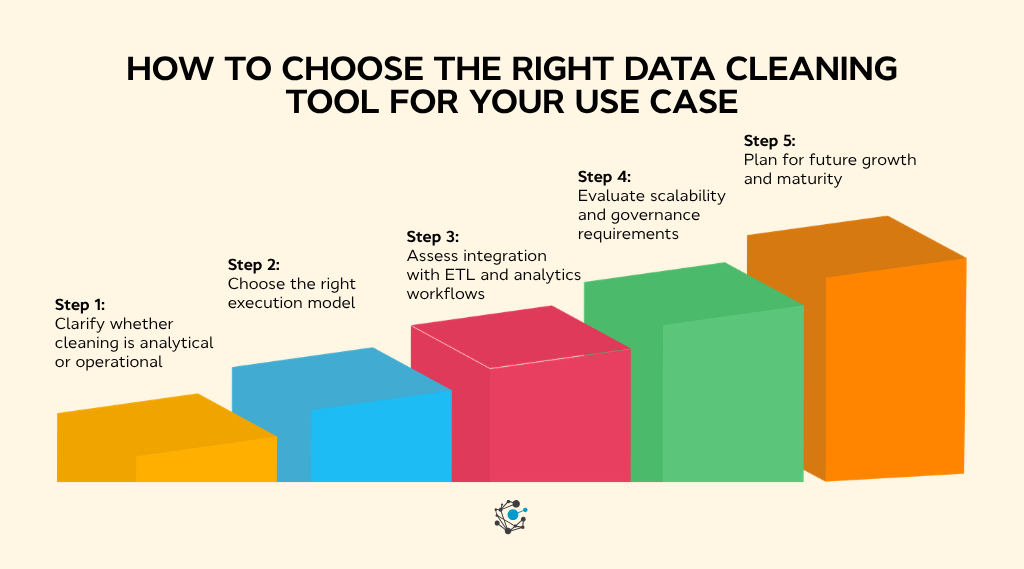
Choosing the right data cleaning tool is less about how many features it has and more about fit. The same tool can feel powerful in one setup and limiting in another, depending on how the data is used, refreshed, and governed.
Five decisions usually make the choice. Walk down the table, land on the column that matches the situation, and the shortlist narrows fast.
|
Decision to make |
Pick a lightweight or self-service tool when… |
Pick an enterprise data quality platform when… |
|
Analytical or operational cleaning |
Cleaning supports specific questions, models, or one-off reports where speed matters more than long-term consistency. |
The same cleaned datasets feed recurring pipelines and shared reporting, where the same logic has to hold every refresh. |
|
Execution model |
Batch runs are fine; cleanup happens once, on demand, or on a periodic schedule tied to a report. |
Data refreshes often and feeds dashboards, applications, or downstream systems where automated, always-on cleaning is the only way to keep up. |
|
Integration with ETL and analytics |
The cleaning tool sits alongside the pipeline and hands off cleaned files, without deep integration. |
Cleaning logic sits inside ingestion and transformation workflows, and quality rules are reusable across pipelines so every team applies the same standard. |
|
Scalability and governance |
The team is small, ownership is informal, and auditability is not yet a requirement. |
Auditability, lineage, and impact analysis matter. Platforms like OvalEdge tie every cleaning rule to a business definition and an owner inside the Enterprise Context Graph, which is how governance stays intact as adoption grows. |
|
Future growth and maturity |
The workload today is contained and unlikely to scale a lightweight tool is honest for the actual work. |
Data usage will grow, more teams will depend on it, and long-term reliability matters more than short-term convenience, especially where analytics and AI are on the roadmap. |
Quick rule of thumb: if most of the "lightweight" column matches, a self-service or lightweight tool is enough. If most of the "enterprise" column matches, automated cleaning with governance and lineage behind it is the honest answer, so every fix stays traceable as more teams rely on the data. That is where enterprise platforms earn their cost.
Also read: Data Quality Tools 2026: The Complete Buyer's Guide to Reliable Data
Move from one-off cleanup to governed data quality
Every tool on this list can clean data. The real question is what happens after the cleaning. When rules run without lineage and ownership behind them, teams end up with fixes no one can explain a few months later, and trust slips right when more parts of the business start depending on the data.
That is the gap enterprise platforms close. As data feeds more dashboards, applications, and AI, cleaning has to be governed, traceable, and repeatable, and it has to run every time the data refreshes.
OvalEdge ties cleaning to the Enterprise Context Graph, the same governed layer of metadata, lineage, and ownership that your analysts and AI agents pull from.
|
If reliable data is critical to analytics and AI on the roadmap, book a demo and see the ECG in practice. |
.png?width=1081&height=173&name=Forrester%201%20(1).png)
.png?width=1081&height=241&name=KC%20-%20Logo%201%20(1).png)