-Jan-19-2026-10-32-05-9265-AM.png)
You likely have more data than ever, yet finding the right dataset and trusting it when it matters can feel frustratingly hard. Reports don’t match, definitions vary across teams, and analysts spend more time validating data than using it. When this happens, confidence levels drop and decision-making slows down.
This problem is widespread.
In the NTT DATA 2023 Innovation Index findings, only 22% of organizations said they trust their own data, and 46% said they do not use data to generate insights or guide decisions.
Without clear metadata, ownership, and governance, data quickly turns into noise. Analytics efforts stall, and AI initiatives struggle to move beyond experimentation.
A data catalog template helps you fix this at the foundation. It provides a consistent structure for documenting datasets, defining business meaning, assigning ownership, and embedding governance. Instead of relying on locally obtained knowledge, your teams gain a shared, trusted view of data.
In this guide, you will learn how to use data catalog templates to bring clarity, trust, and scalability to your data environment.
What a data catalog template should include
A strong data catalog template captures all the metadata required to understand, trust, and govern data assets across the organisation. To stay usable and scalable, the template should group metadata into clear categories that serve both technical and business users.
1. Technical metadata elements
Technical metadata describes the structure and origin of the data. These fields help data engineers and analysts understand how a dataset is built and where it comes from.
What to include
-
Source system or platform
-
Dataset name
-
Database and schema
-
Table and column names
-
Data types and formats
-
Primary keys and constraints
Why it matters: Without technical metadata, users cannot reliably query or integrate data. Clear schema-level documentation reduces errors, speeds up onboarding, and supports automation.
Example fields: Dataset Name, Source System, Schema, Column Definition, Data Type
2. Business metadata fields
Business metadata adds context by explaining what the data represents and how it should be used from a business perspective.
What to include
-
Business description
-
Business owner or data steward
-
Linked business glossary terms
-
Intended use cases
-
Data sensitivity or criticality
Why it matters: Business metadata bridges the gap between technical teams and decision makers. It ensures everyone uses the same definitions and understands the purpose of the data.
Example fields: Business Description, Data Owner, Data Steward, Data Sensitivity
3. Operational and usage metadata
Operational metadata tracks how data is used and maintained over time.
What to include
-
Last updated date
-
Refresh frequency
-
Data pipeline status
-
Usage frequency
-
Data quality scores or indicators
Why it matters: This information helps teams assess reliability and freshness. It also supports impact analysis and prioritization when data issues arise.
Example fields: Last Update, Refresh Cadence, Usage Frequency, Data Quality Score
4. Security and governance metadata
Governance metadata ensures data is protected and compliant with internal policies and regulations.
What to include
-
Data classification level
-
Access restrictions
-
Regulatory compliance tags
-
Retention requirements
-
Sensitive data indicators
Why it matters: Including governance fields directly in the template helps embed compliance into everyday data usage and reduces regulatory risk.
Example fields: Access Level, Compliance Requirement, Sensitive Data Flag
Best free data catalog template you can use
Choosing the right data catalog template depends on your data maturity, team size, and governance needs. Below you can find the most commonly used free template, along with guidance on when each one works best.
This is a simple and flexible template designed for teams getting started with cataloging. You can copy this structure directly into Excel or Google Sheets, or your spreadsheet program
Dataset Level Metadata Template
Sheet Name: Data Catalog
|
Column Name |
Description |
Example Value |
|
Dataset Name |
Unique, recognizable name of the dataset |
customer_orders |
|
Dataset Description |
Explains what the data contains and why it exists |
Customer purchase transactions |
|
Business Domain |
Identifies the business function responsible |
Sales |
|
Source System |
Shows where the data originates |
Salesforce |
|
Data Owner |
Business is accountable for data usage |
Head of Sales |
|
Data Steward |
Contact for metadata accuracy |
Data Analyst |
|
Primary Use Case |
The main way the data is used |
Revenue reporting |
|
Refresh Frequency |
Indicates how often data updates |
Daily |
|
Last Updated |
Shows data freshness |
2026-01-15 |
|
Data Sensitivity |
High-level classification |
Internal |
|
Documentation Link |
Points to detailed documentation |
Confluence URL |
How to use this template effectively
-
Start by documenting only high-value and frequently used datasets.
-
Ensure the Dataset Name, Description, Owner, and Refresh Frequency are always filled.
-
Review and update entries regularly to maintain trust.
Best for
-
Small teams or early-stage data programs
-
Manual documentation in spreadsheets
-
Quick visibility into key datasets
This type of free data catalog template is often built in Excel or Google Sheets and works well as a starting point before moving to automation.
What this template does and does not do
This data catalog template is intended for data governance teams, data leaders, or small working groups who need a structured way to document and discuss critical datasets. It creates internal visibility and a shared reference point for ownership, definitions, and priorities.
The template does not provide enterprise-wide data discovery, dataset search, or access request workflows. Users cannot browse data, request permissions, or assess availability directly from the spreadsheet. These capabilities are introduced later through a dedicated data catalog tool once metadata is imported and operationalized.
By setting these expectations clearly, the template can be used effectively as a foundation without being mistaken for a long-term solution.
Step-by-Step guide: How to create a data catalog using a template
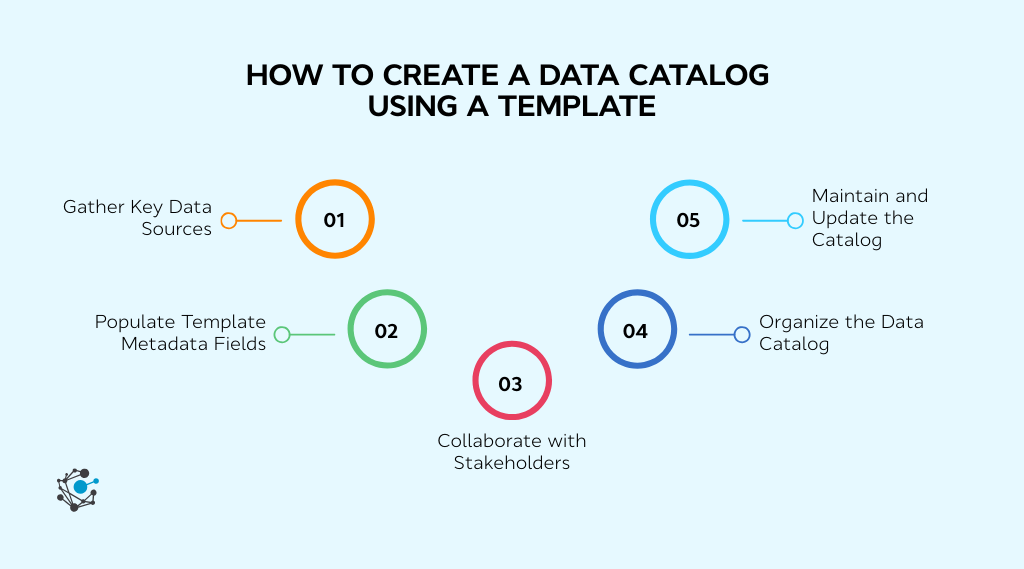
A data catalog template delivers value only when it is applied with discipline and consistency. Each step below explains what to do, why it matters, and includes three clear actions you can apply immediately.
Step 1: Gather key data sources
Before documenting metadata, you need a complete view of where data lives. Many catalog efforts fail because teams only document what they already know, leaving critical systems undocumented. This step establishes scope and prevents gaps that weaken trust in the catalog.
Actionable steps
-
Create a master list of all databases, warehouses, spreadsheets, APIs, and third-party data sources.
-
Categorize each source by type, such as transactional, analytical, external, or manual.
-
Flag high-value and frequently used sources first so the catalog delivers quick wins.
Step 2: Populate template metadata fields
Once sources are identified, the template becomes the single place to standardize metadata. Consistent population of fields is more important than perfection at this stage.
Actionable steps
-
Fill in required fields for every dataset, including name, description, owner, source, and refresh frequency.
-
Use plain language for business descriptions so non-technical users can understand the data.
-
Add governance-related fields early, such as data sensitivity or compliance tags, to avoid retrofitting later.
Step 3: Collaborate with stakeholders
Metadata created in isolation quickly becomes inaccurate. Collaboration ensures definitions reflect real usage and ownership is clear. This step also increases adoption by involving teams early.
Actionable steps
-
Review dataset entries with data owners and confirm the accuracy of descriptions and ownership.
-
Ask business users to validate whether the data's meaning aligns with how it is used in reports.
-
Assign a named data steward responsible for approving changes going forward.
Step 4: Organize the catalog template for internal visibility
The goal at this stage is internal visibility and alignment, so everyone working on data governance is referring to the same definitions, ownership, and priorities. Organizing the template properly helps the governance team quickly understand which datasets exist, who is responsible for them, and which assets matter most to the business. It also makes conversations with stakeholders more productive by providing a clear, structured reference.
Actionable steps
-
Group datasets by business domain or function to reflect how the organization thinks about data.
-
Use consistent, human-readable names and descriptions so the template can be understood without technical context.
-
Add simple tags such as “high value,” “regulated,” or “executive reporting” to support prioritization discussions.
At this stage, the template improves internal clarity and coordination. It does not replace the search, browsing, or access request capabilities of a true data catalog platform.
Step 5: Maintain the template as a governance working document
A data catalog template should be treated as a working document for the governance team. Its purpose is to stay accurate enough to support decision-making, prioritization, and planning for future tooling. Maintenance ensures the template reflects current ownership and scope, but it should remain lightweight. Over-investing in spreadsheet upkeep often signals that the organization is ready to move to a dedicated data catalog tool.
Actionable steps
-
Review high-value datasets on a regular cadence to confirm ownership and descriptions are still accurate.
-
Update entries when new critical data sources are introduced or when accountability changes.
-
Use the template to identify gaps, risks, or dependencies that justify investment in a data catalog platform.
Access requests, dataset search, and enterprise-wide discoverability are not handled through the template. These capabilities are introduced later when metadata is imported into a dedicated data catalog tool.
Best practices for maintaining your data catalog template
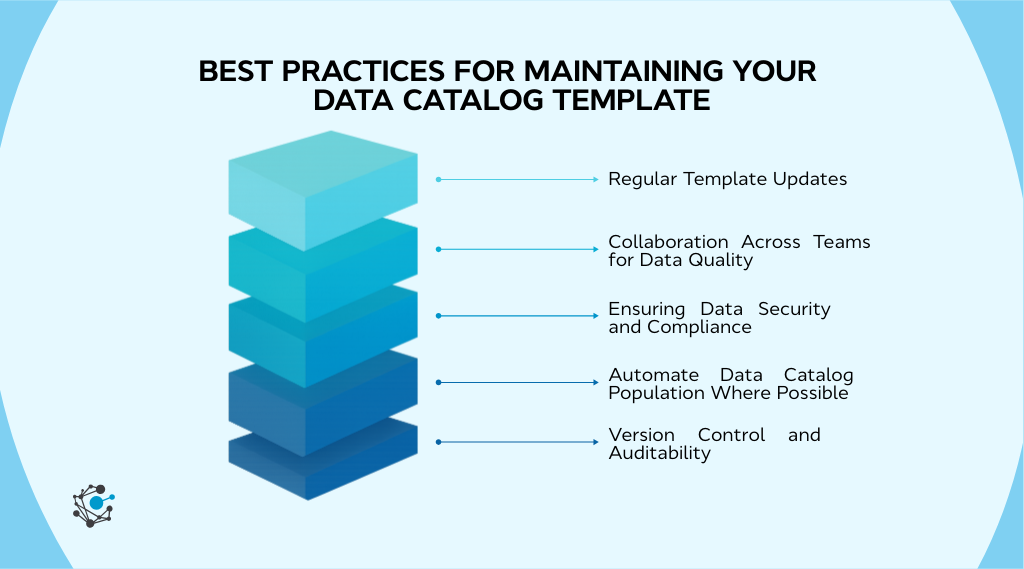
A data catalog template is most effective when it is used with clear boundaries. It is a lightweight governance aid, not a replacement for a data catalog platform. The practices below focus on helping a data or governance team extract value from a spreadsheet without over-investing time or creating unrealistic expectations.
1. Scope the template to high-value assets
Trying to document everything at once quickly turns a template into a maintenance burden. The strongest results come from focusing only on datasets that matter most to the business.
Start with data that supports core reporting, regulatory exposure, executive decision-making, or high-impact analytics. This keeps the template actionable and makes it easier to demonstrate value to stakeholders.
2. Assign clear ownership from the start
A template without ownership becomes outdated almost immediately. Each dataset listed should have a clearly named business owner or steward who is accountable for definitions and context.
Ownership in this phase is about accountability, not enforcement. It ensures there is a known point of contact when questions arise and sets the foundation for stewardship workflows later in a data catalog tool.
3. Establish a lightweight review cadence
The goal of maintenance is relevance, not perfection. A simple review schedule for high-value datasets helps keep the template useful without creating unnecessary overhead.
Reviews should focus on confirming descriptions, ownership, and scope rather than expanding the number of fields captured. If maintaining accuracy becomes difficult, it is often a signal that the organization has outgrown spreadsheets.
4. Use the template to identify when to stop
A data catalog template is a temporary mechanism. It is most valuable when it helps teams recognize the limits of manual documentation.
Signs it is time to move on include frequent schema changes, growing demand for search and access visibility, or increasing governance requirements. At that point, the template has done its job by clarifying priorities and preparing metadata for a proper data catalog platform.
Conclusion
A well-structured data catalog template is often the first step toward stronger data governance and clearer metadata management. It helps teams document datasets consistently, reduce confusion around definitions, and create a shared internal understanding of critical data assets. When used correctly, a template brings immediate clarity while supporting better alignment across data and governance teams.
As data environments grow in size and complexity, many organizations reach a point where spreadsheets are no longer sufficient. This is a natural transition point rather than a failure of the template. The value of the template lies in helping teams identify priorities, establish ownership, and prepare high-value metadata for the next stage.
This is where OvalEdge fits into the journey. OvalEdge builds on the structure created by a data catalog template and extends it with automation, stewardship workflows, governance controls, and managed metadata at scale. Teams can move from static documentation to an actively governed data catalog without starting over.
If you are currently using or planning to use a data catalog template and want to see how it can evolve into a centralized, governed catalog, exploring OvalEdge is a logical next step.

Book a demo to see how your existing metadata foundation can scale to support analytics, compliance, and confident decision-making.
Frequently asked questions
1. What is the difference between a data catalog and a data dictionary?
A data catalog provides a high-level inventory of data assets along with technical, business, operational, and governance metadata. It focuses on discovery, ownership, usage, and compliance across the organization.
A data dictionary is more technical and operates at the field or column level. It documents schema details such as data types, constraints, and definitions, and is often used by engineers and analysts as a reference rather than a discovery tool.
2. How do I use a data catalog template in my organization?
A data catalog template is typically used as a standardized format to document metadata for all datasets. Teams start by identifying data sources, then populate required fields such as dataset description, owner, refresh frequency, and sensitivity.
Once populated, the template becomes a shared reference that supports analytics, governance, and onboarding. Over time, it can be integrated into more automated catalog solutions as maturity increases.
3. Can a data catalog template be imported into a data catalog tool later?
Yes. A well-structured data catalog template is often used as a starting point before adopting a dedicated data catalog platform. Most tools can ingest spreadsheet-based metadata and map fields such as dataset name, description, ownership, and sensitivity directly into the catalog.
Starting with a template makes the transition easier because key datasets are already documented and prioritized. This reduces setup time and helps teams see value faster once a tool is introduced.
4. How do I transition from a template to an automated data catalog system?
The easiest transition happens when your template already follows clear metadata standards. Most automated tools can ingest existing templates and map fields directly into the catalog.
Platforms like OvalEdge allow organizations to start with structured templates and gradually introduce automation, stewardship workflows, and governance controls without rework.
5. What are the key benefits of using a data catalog template?
A data catalog template saves time, improves consistency, and reduces confusion around data definitions. It also supports governance by making ownership, sensitivity, and compliance visible at the dataset level.
Most importantly, it builds trust by giving users a reliable way to understand and evaluate data before using it.
6. Can I customize a data catalog template for my specific needs?
Yes. Templates should be adapted to match your industry, regulatory environment, and internal processes. Common customizations include adding compliance fields, domain-specific tags, or quality indicators.
Starting with a flexible template makes it easier to evolve toward enterprise-scale data cataloging as requirements grow.
.png?width=1081&height=173&name=Forrester%201%20(1).png)
.png?width=1081&height=241&name=KC%20-%20Logo%201%20(1).png)