-1.png)
Data warehouse migration is the structured process of moving data, schemas, ETL pipelines, and reporting workloads from one data warehouse to another, usually from a legacy on-prem system to a cloud platform like Snowflake, BigQuery, Redshift, or Databricks. The goal is not just relocation. It is preserving data integrity, keeping lineage and governance intact, and getting the new platform live with minimal downtime.
According to S&S Insider, the cloud data warehouse market is on track to hit $43.57 billion by 2032, growing 23 to 24% a year. Most of that growth is teams retiring legacy warehouses they have outgrown.
This guide walks through the five phases of a working migration, the trade-offs between lift-and-shift and re-architecture, the tools that help, and the governance and lineage controls that decide whether the project lands well or quietly leaks data trust.
The 5 phases of data warehouse migration
-
Assess — inventory data, schemas, ETL jobs, BI reports, and dependencies. Decide what to migrate, what to retire.
-
Plan — pick the target platform, the migration approach (lift-and-shift, re-platform, re-architect), and the cutover model (big bang or phased).
-
Build — recreate schemas, port ETL or ELT pipelines, set up governance, lineage, and access control on the new platform.
-
Validate — run parallel loads, compare row counts and query results, run user acceptance testing on dashboards and reports.
-
Cut over — switch traffic, monitor, and decommission the legacy warehouse. Keep a rollback path open for the first 2 to 4 weeks.
What is data warehouse migration?
Data warehouse migration is the structured process of moving data, schemas, ETL pipelines, and reporting workloads from one data warehouse environment to another.
In most cases, organizations migrate from legacy on-premise systems to cloud platforms such as Snowflake, BigQuery, Redshift, or Databricks. The objective is not just to improve performance or scalability, but to ensure that data integrity, lineage, and governance remain intact throughout the transition.
A complete migration includes more than moving data. It involves transferring schemas, rebuilding pipelines, migrating metadata, and validating downstream dashboards. When these elements are not migrated together, teams often face broken reports, missing context, and reduced trust in data after go-live.
| If you are still evaluating whether a warehouse is the right fit for your needs, refer to this database vs data warehouse guide. |
Why migrate your data warehouse?
Migrating to a new data warehouse is not just a technical upgrade. It is an opportunity to fix long-standing data issues, improve trust, and create a foundation for scalable analytics.
According to a 2024 study, organizations migrating to the cloud see a 30 to 40% reduction in total cost of ownership over three years, along with a 63% improvement in time-to-insight.
Here’s why companies are increasingly migrating their data warehouses:
Governance and data trust:
Legacy data warehouses often accumulate undocumented pipelines, unclear ownership, and inconsistent policies over time. Teams rely on tribal knowledge to understand which datasets are reliable and which are not.
A migration resets that context.
Without a clear record of lineage, ownership, and policies, the new platform inherits the same problems as the old one. This is why modern migration strategies treat governance, metadata, and lineage as core components of the migration process, not as post-migration fixes.
Business drivers for migration:
-
Cost savings: Traditional data warehouses come with high infrastructure and maintenance costs. Cloud-based warehouses reduce capital expenditure and shift to a usage-based pricing model.
-
Agility and flexibility: Cloud platforms like AWS, Google Cloud, and Microsoft Azure provide on-demand scalability, allowing teams to adjust compute and storage based on workload.
-
Faster analytics and decision making: Modern data warehouses support faster queries and more frequent insights, helping teams respond to business changes more effectively.
-
Improved BI and self-service analytics: A modern data platform enables broader access to data, allowing non-technical users to explore and analyze data independently.
Technical drivers for migration:
-
Legacy system limitations: Legacy data systems often struggle with processing large amounts of data and running advanced analytics at speed. As businesses scale, these systems cannot keep up, leading to slow query times, inaccurate reporting, and ultimately, lost business opportunities.
-
Scalability: A traditional data warehouse becomes harder to scale as the data volume increases. Cloud data warehouses, on the other hand, offer nearly infinite scalability, allowing businesses to grow their data operations without worrying about storage constraints.
-
Security and compliance: Cloud platforms offer enhanced security measures, including advanced encryption, continuous monitoring, and compliance with industry standards like GDPR, SOC 2, and HIPAA. Ensuring that your data remains secure during and after migration is essential, and cloud providers offer tools and frameworks to help manage and enforce security policies.
-
Real-time analytics: As businesses demand more real-time insights, the need for cloud-native solutions that support real-time analytics becomes clear. Migrating to the cloud allows organizations to handle streaming data and real-time processing, ensuring that data can be analyzed as it’s created.
Understanding the key drivers behind data warehouse migration, both business and technical, can help you recognize the transformative potential of this transition.
Benefits of data warehouse migration
Migrating to a cloud-based data warehouse improves performance, scalability, and cost efficiency. More importantly, it gives teams a chance to rebuild trust, improve governance, and prepare for advanced analytics.
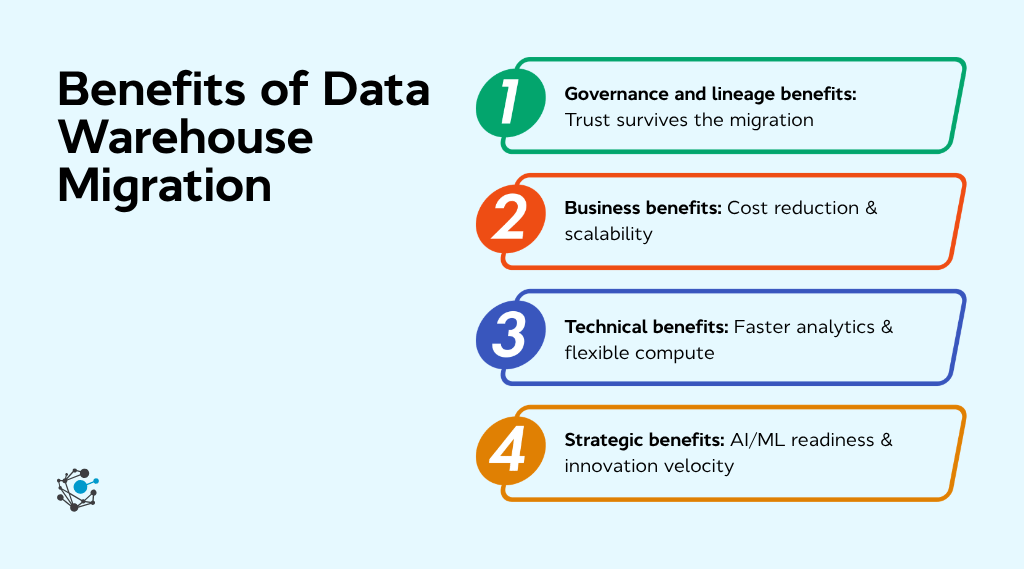
Governance and lineage benefits: Trust survives the migration
The hardest part of a migration is not moving the data. It is keeping trust intact. Before migration, teams rely on context to know which datasets are reliable. After migration, that context disappears unless metadata and lineage move with the data.
Cloud data warehouses provide access controls, encryption, and audit logs. What they do not provide is a record of how data flows across systems. They do not track which tables feed dashboards, which columns have quality issues, or which datasets are regulated.
That context lives in your data catalog.
If the catalog moves with the data, reports remain trustworthy from day one. If it doesn't, you spend the next quarter rebuilding lineage by hand.
With a metadata-led approach, the catalog becomes the migration record. Tools like OvalEdge carry forward table relationships, ownership, policies, and column-level lineage, helping teams validate reports and meet audit requirements without rebuilding context.
Business benefits: Cost reduction & scalability
Cloud-based data warehouses reduce the need for upfront infrastructure investment. Organizations move from fixed hardware costs to a usage-based pricing model, which helps control spending.
Teams can scale storage and compute resources as needed, avoiding over-provisioning and reducing operational overhead.
Technical benefits: Faster analytics & flexible compute
Cloud data warehouses separate storage and compute, allowing teams to scale workloads based on demand. This improves query performance and supports concurrent usage across teams.
Modern platforms also reduce latency for complex queries and allow teams to process large datasets more efficiently. This results in faster reporting cycles and more responsive analytics environments.
Strategic benefits: AI/ML readiness & innovation velocity
Modern data warehouses are designed to support advanced analytics, artificial intelligence, and machine learning initiatives.
When combined with strong governance and metadata management, these platforms help teams build reliable data pipelines, train models on trusted data, and accelerate innovation cycles.
Key types of data warehouse migrations
When considering a migration, businesses can follow different paths, each with its benefits and challenges. Here’s a breakdown of the most common types of migrations:
On-premises to cloud
Migrating from an on-premises data warehouse to a cloud platform such as AWS, Azure, or Google Cloud is one of the most common migration strategies. This transition allows businesses to scale their data storage and computing power on demand, providing greater flexibility, improved performance, and potential cost savings.
Cloud platforms offer enhanced capabilities like real-time analytics, faster processing, and automatic scaling, making them ideal for organizations with fluctuating or growing data needs.
However, the migration process is not without challenges. Key concerns include ensuring data security, complying with industry-specific regulations (such as GDPR or HIPAA), and integrating legacy systems with new cloud-based tools. The migration plan must address these complexities to minimize risk and downtime.
For example, a manufacturing company that needs to scale its data storage capabilities to accommodate growing sensor data from production lines might migrate to the cloud for more flexibility and better storage options.
Cloud to cloud / Hybrid
Hybrid or cloud-to-cloud deployments are now the norm. An IDC survey found that, in Q3 2024, 88% of cloud buyers were using or planning a hybrid cloud, and 79% were already running multiple providers. This type of migration involves moving data from one cloud platform to another or integrating on-premises data systems with cloud-based infrastructure.
The main benefits of cloud-to-cloud migrations include improved interoperability, better cost optimization, and enhanced access to innovative features and services.
However, challenges such as vendor lock-in and platform compatibility need to be considered. Migrating across different cloud platforms can introduce technical hurdles, and the complexity of managing data across multiple platforms requires careful planning and coordination.
For example, companies may migrate from a less flexible or outdated cloud service to a more modern or specialized platform, such as moving from AWS to Google Cloud or integrating multiple cloud services for greater efficiency.
Lift-and-shift vs re-platform vs re-architect: which approach fits your migration
When planning a data warehouse migration, organizations must choose between different migration approaches. The three primary strategies, including lift-and-shift, re-platforming, and re-architecture, come with their own set of benefits, risks, and resource requirements.
|
Approach |
What you change |
Effort |
Timeline |
Cost |
When it fits |
What you lose |
|
Lift-and-shift |
Hardware only. Same schema, same SQL, same ETL. |
Low |
8 to 12 weeks |
Low to medium |
You need to exit a data center quickly and optimize later. |
Limited cloud-native benefits, such as cost efficiency and performance gains. |
|
Re-platform |
Schema and ETL get cloud-native rewrites. Dashboards mostly stay the same. |
Medium |
12 to 24 weeks |
Medium |
You want cloud-native features like elastic scaling without rebuilding analytics entirely. |
Some schema and design decisions become harder to change later. |
|
Re-architect |
Full redesign. New pipelines, new architecture, often new BI. |
High |
24 to 52 weeks |
High |
You want to modernize data models, governance, and analytics together. |
Higher cost, longer timelines, and increased complexity. |
Each approach offers a different balance of speed, cost, and long-term benefits, depending on the organization’s goals, budget, and timeline. Organizations should carefully evaluate their current infrastructure, business needs, and resources to determine the best strategy for migration.
Data warehouse migration strategy framework
A successful data warehouse migration requires not just technical know-how but a well-structured approach to ensure alignment with business goals. Below is a strategy framework to guide you through the process:
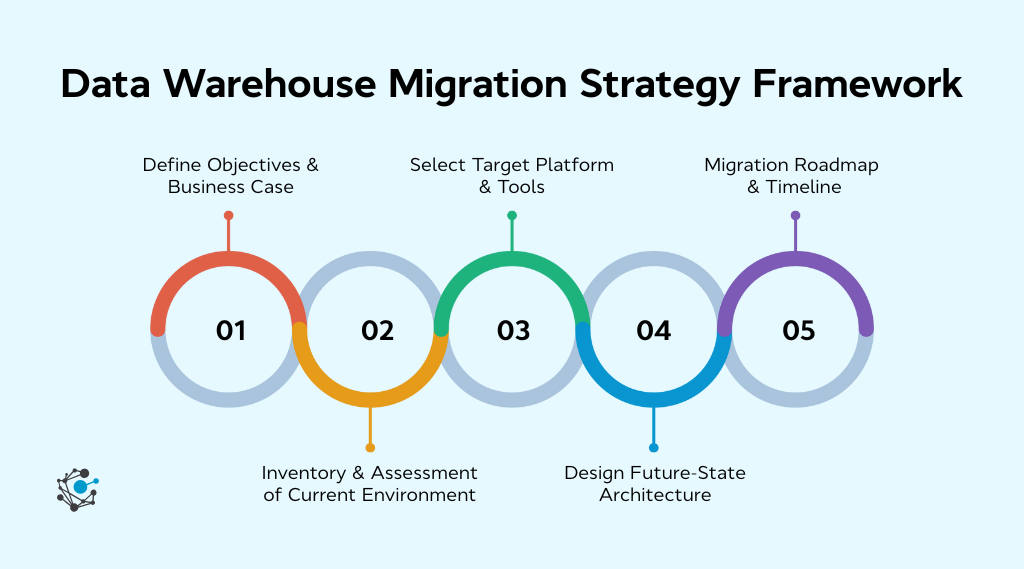
Step 1 – Define objectives & business case
Start by aligning your migration goals with your business needs. Clearly define the objectives, whether it’s reducing costs, improving performance, or enabling real-time analytics. Establishing measurable metrics upfront ensures that the migration process remains focused on driving the right outcomes.
Whether it’s a reduction in storage costs, a boost in query performance, or a more agile data platform, these goals will serve as benchmarks to measure success and guide decision-making throughout the migration.
Step 2 – Inventory & assessment of current environment
Most migrations fail at this step, not at cutover. Teams often underestimate how much undocumented logic exists in the legacy warehouse. This includes unused ETL jobs, dashboards with no clear owner, and undocumented joins that still drive reports.
Run the inventory through your enterprise data catalog. A catalog provides visibility that spreadsheets cannot. It helps you understand what exists, how it is used, and what actually needs to move.
A working inventory checklist:
-
Data assets: Every table, view, schema, and external dataset, along with row counts and last-updated timestamps
-
Lineage: Which sources feed which tables, and which tables feed dashboards. Column-level lineage where possible
-
Usage: Query activity over the last 90 days. Tables with no usage are candidates for retirement
-
Ownership: A clearly defined owner for each dataset. Missing ownership signals risk
-
Policies: PII classification, regulated datasets (GDPR, HIPAA, SOX), and retention rules
This step is also where you decide what not to migrate. Reducing unnecessary data before migration lowers costs, simplifies validation, and improves overall performance.
Step 3 – Select target platform & tools
Choosing the right cloud platform and tools is crucial to ensuring that your data warehouse supports both current and future needs. Key factors to consider include scalability, cost structure, compliance standards, and integration with other systems. Popular platforms such as AWS, Google Cloud, and Azure offer various solutions depending on your organization’s needs.
Additionally, migration tools like ETL (Extract, Transform, Load) solutions, data pipeline automation tools, and data quality management platforms will help streamline the migration process and ensure a smooth transition to the cloud.
Step 4 – Design future-state architecture
Design an architecture that is both flexible and scalable to meet your evolving business requirements. Consider shifting to a data lakehouse architecture, which combines the storage flexibility of a lake with the query performance of a warehouse.
Ensure your data pipeline is optimized for cloud-native services to take full advantage of the cloud’s scalability, security, and real-time processing capabilities. A well-designed future-state architecture ensures that your new data warehouse can handle growing data volumes while supporting advanced analytics and reporting.
Step 5 – Migration roadmap & timeline
Develop a detailed migration plan that outlines the stages of your migration, whether you opt for a "big bang" approach or a more gradual phased rollout. The roadmap should account for resource allocation, including team expertise, stakeholder involvement, and technology requirements.
Set realistic timelines, ensuring that each phase is executed efficiently. Identify any potential risks and build in contingencies to mitigate them. A clear roadmap ensures the migration stays on track and meets your business objectives while minimizing disruption to ongoing operations.
|
Stat: Studies show that organizations with a structured migration strategy see up to 57% lower operating costs and 45% faster time-to-market. In fact, it also makes a business 3.5 times more likely to succeed in its digital transformation initiatives. |
Data warehouse migration steps
The data warehouse migration process involves several critical steps to ensure a smooth and efficient transition to a new platform. Each step is vital for maintaining data integrity, system performance, and operational continuity.
-
Migrate ETL/ELT pipelines: Ensure that your data transformation processes, including extraction, transformation, and loading (ETL) or extraction, loading, and transformation (ELT), are successfully migrated to the new platform with minimal disruption to workflows. If you are weighing tooling options, open source ETL tools are worth a look alongside paid platforms like Fivetran and Matillion.
-
Migrate schema, data models & metadata: Transfer schemas, data models, and metadata to the new platform together. Doing them together is the only way to keep data lineage traceable and the catalog usable on day one. Splitting them and patching later is the most common cause of post-migration trust collapse.
-
Reconnect BI, analytics & reporting layers: Reconnect all business intelligence (BI) tools, analytics platforms, and reporting layers to the new data warehouse to ensure a seamless transition and uninterrupted access to critical insights.
-
Conduct testing, validation & performance benchmarking: Run three layers of testing in parallel runs: row-count and checksum validation against the legacy warehouse, query result comparisons on your top 50 dashboards, and load tests at peak volume. Pair this with data quality testing on critical tables so you catch silent corruption before users do. Document everything in the catalog so the validation evidence is auditable.
-
Execute go-live, cutover & rollback strategy: Plan the final cutover to the new platform, ensuring all systems are switched over effectively. Have a rollback strategy in place to address any unforeseen issues, minimizing potential downtime and risks.
During the migration process, ensuring data integrity is crucial. With cloud migrations, organizations can maintain up to 99.99% data integrity, significantly reducing the risk of data loss or corruption. This level of assurance helps keep your data accurate and reliable throughout the migration process.
Best practices for data warehouse migration
Following best practices during data warehouse migration ensures a smooth transition with minimal disruption. Implementing these strategies can help safeguard data integrity, reduce risks, and maximize the value of your new data platform.
-
Migrate incrementally and keep the legacy warehouse running. A parallel run model is safer than a big-bang switch because it helps catch discrepancies before users do.
-
Catalog before you migrate, not after. If you do not know what you have, you will migrate the wrong things and miss the right ones. Start with inventory and lineage.
-
Automate SQL conversion where possible. Tools like Snowflake, SnowConvert, and Google BigQuery Migration Tool can handle a large portion of SQL translation. Human review is still required for complex logic.
-
Test against the legacy warehouse, not against itself. Validate using row counts, checksums, and query result comparisons. If results do not match, the migration is not complete.
-
Carry over governance instead of rebuilding it. Roles, policies, masking rules, and retention settings must be in place on day one. Use a catalog that supports policy mapping and export.
-
Preserve column-level lineage. When validating reports or handling audits, lineage provides the traceability needed to explain how data flows from source to dashboard.
-
Plan dashboard cutover, not just data cutover. A migration is not complete until BI tools like Tableau, Power BI, or Looker are reconnected and validated dashboard by dashboard.
-
Document the rollback path. Keep the legacy warehouse accessible for 2 to 4 weeks after cutover. Decommission only after full validation and stakeholder sign-off.
-
Monitor cost and performance from day one. Cloud platforms bill based on usage. Set alerts early to avoid unexpected costs and performance issues. Data observability tooling helps catch performance regressions and cost spikes before they hit your bill.
By following these best practices, you can minimize risks and ensure a successful data warehouse migration. Whether it's ensuring data quality, optimizing performance, or maintaining security, these strategies form the backbone of a smooth migration process.
For businesses looking to simplify and accelerate their migration, OvalEdge can provide essential support with data governance, metadata management, and lineage tracking tools that streamline the transition and ensure ongoing success.
Conclusion
A data warehouse migration is one of the few projects where the real risks show up after go-live. Broken dashboards, missing lineage, and audit gaps often appear weeks later, not during cutover.
Teams that get migration right focus on three things. They build a complete inventory before moving anything. They carry governance and lineage into the new platform. They validate reports with business users before signing off.
OvalEdge supports this workflow at the metadata layer. Before migration, the catalog helps you identify what to migrate, what to retire, and who owns each dataset. During migration, lineage ensures reports remain traceable. After migration, governance policies continue to enforce access, quality, and compliance.
If you want to see how this works on your own data warehouse, schedule a walkthrough. We will use your actual metadata to map dependencies, identify risks, and show how your migration can run without breaking data trust.
FAQs
1. How long does a typical data warehouse migration take?
Most migrations range from 8 to 24 weeks, depending on data volume, transformation complexity, integration dependencies, and change management. Running a pilot or phased rollout helps validate scope, timelines, and risks early while improving predictability.
2. How can I estimate the ROI of a migration initiative?
Calculate infrastructure savings, reduced maintenance effort, automation gains, improved reporting speed, and risk reduction. Compare the total cost of ownership before and after migration, including productivity, data accuracy, and analytics-driven business impact.
3. Which roles are essential for a successful migration team?
A qualified team includes cloud architects, data engineers, DBAs, ETL specialists, QA analysts, security leads, and business stakeholders. Strong project governance and communication help coordinate tasks, validate requirements, and avoid rework.
4. What should I do with outdated or redundant legacy data?
Perform data profiling, classification, and usage analysis to archive, cleanse, retire, or compress non-critical datasets. This reduces storage costs, migration time, and technical debt while maintaining compliance through defined retention policies.
5. Can a migration be performed without business downtime?
Yes, by using phased migration, change data capture, parallel environments, incremental sync, and automated reconciliation. This approach keeps analytics operational while teams validate accuracy before cutover. Tools like OvalEdge help track dependencies and lineage before cutover, reducing the risk of downtime during migration.
6. Which security or compliance standards should be considered post-migration?
Adopt encryption, RBAC, audit trails, and data lineage visibility alongside compliance frameworks like HIPAA, SOC2, GDPR, or PCI-DSS. Continuous monitoring ensures evolving regulatory alignment and secure data access.
7. What tools do I need for a data warehouse migration?
A typical migration uses three tools: SQL converters like SnowConvert or BigQuery Migration Tool, ETL/ELT platforms such as Fivetran or Airbyte, and a data catalog like OvalEdge. The first two move data, while the catalog preserves lineage, governance, and auditability. On Snowflake, data masking helps carry over PII protection rules without rebuilding them.
.png?width=1081&height=173&name=Forrester%201%20(1).png)
.png?width=1081&height=241&name=KC%20-%20Logo%201%20(1).png)