-Mar-11-2026-09-04-14-8128-AM.png)
A metric changes in a dashboard, and suddenly, no one agrees on the number.
Finance sees one version of revenue. Sales reports another. The data team checks the pipeline and confirms the transformation logic is correct. Yet the real question remains unanswered: which definition of the metric is the business actually using?
This confusion often happens because organizations separate technical data tracking from business definitions. Data lineage shows how information moves through pipelines, tables, and reports, but it rarely explains the business meaning behind those numbers. Business glossaries define terms and KPIs, yet they are frequently disconnected from the systems that produce the data.
The governance risk is growing as data environments expand, and AI systems generate more information across pipelines.
A 2026 Gartner press release predicts that by 2028, 50% of organizations will adopt a zero-trust posture for data governance due to the rise of unverified AI-generated data, increasing the need for traceable and verifiable data assets.
Integrating data lineage with a business glossary addresses this challenge. By linking technical data flows with standardized business definitions, organizations can trace metrics from source systems to dashboards while preserving clear business context and governance accountability.
This guide explains how that integration works, why it matters for governance, and the practical steps required to implement it successfully.
What does integrating data lineage with business glossary mean?
Integrating data lineage with a business glossary means linking technical data flows with business terminology, creating a comprehensive, traceable path from raw data through to final insights.
This integration allows for better semantic alignment between technical data structures and business definitions, making it easier to understand how data supports business decisions. At its core, this integration creates a bridge between two key data management areas:
-
Data Lineage: The technical visualization of how data moves, transforms, and is used across systems.
-
Business Glossary: A repository that standardizes business terms, ensuring consistent definitions and usage across the organization.
The integration ensures that every data point is tied back to a business term, allowing for end-to-end traceability. This means that from the moment data is collected, it’s mapped to the relevant business concept, through transformations, and into the reports and dashboards where decisions are made.
As a result, business teams can trust the data’s origin, while technical teams can ensure the data meets business expectations.
Core components of lineage glossary integration
To integrate data lineage with a business glossary effectively, there are several key components that need to be addressed:
|
Component |
What it enables |
Why it matters |
|
Standardized business glossary |
Defines business terms, KPIs, and metrics consistently across teams |
Ensures everyone interprets data using the same definitions, reducing reporting conflicts and improving data trust |
|
Automated technical lineage |
Captures how data moves across pipelines, transformations, and systems |
Helps teams trace the origin of data, identify dependencies, and assess the impact of changes |
|
Metadata integration layer |
Connects technical metadata with business glossary terms |
Links datasets, pipelines, and reports with business definitions so technical flows reflect business meaning |
|
Bidirectional traceability |
Allows users to trace data from business terms to technical sources and back |
Enables both business users and technical teams to investigate issues, validate metrics, and support governance audits |
How lineage glossary integration differs from standalone lineage or glossary
While data lineage and business glossaries are valuable on their own, the integration of both offers more robust governance and traceability.
-
Standalone Lineage: Provides a technical view of how data moves across systems, but lacks the business context that helps users understand the data’s significance. It only shows "how" data flows, not "why" it matters to the business.
-
Standalone Glossary: Offers definitions and context for business terms but does not provide visibility into how these terms relate to actual data. A glossary alone does not trace where data comes from, how it’s transformed, or where it’s used.
-
Integrated Model: This is where the power of integration shines. The integrated model connects business terms to logical models, then ties them to physical assets, their transformations, and finally to reports and dashboards. This gives a comprehensive view of data flow with full business context.
|
Here's a simple representation of this flow: 1. Business term → 2. Logical model → 3. Physical asset → 4. Transformation → 5. Report |
How data lineage works in modern data environments
Data lineage in modern environments is more complex than ever. It involves tracking the flow of data across various systems, pipelines, and transformations, from its source to its final destination. With the increasing use of cloud-based technologies, APIs, and diverse data platforms, understanding how data moves is critical for maintaining data quality, governance, and security.
Metadata capture across pipelines
Data lineage begins with metadata capture, which is the foundation for understanding how data flows. This metadata can come from multiple sources, such as ETL tools, APIs, cloud data warehouses, and BI layers.
Automated tools can capture this metadata, eliminating the need for manual tracking and ensuring that lineage data is up-to-date and accurate. Manual metadata capture can be prone to errors and often fails to keep pace with changes in complex environments.
Table-level vs column-level lineage
There are two types of data lineage: table-level and column-level.
-
Table-level lineage shows the flow of data between systems and tables, offering a broad overview of how data moves. While it’s useful for understanding general data flow, it doesn’t provide the granular detail needed for effective governance or detailed analysis.
-
Column-level lineage takes this a step further, offering traceability at the column level. This level of detail is necessary for KPI-level traceability and ensuring data integrity. When it comes to glossary integration, column-level lineage is particularly important because it links specific data points to defined business terms, ensuring full visibility of how business-relevant data is processed.
Active metadata and automation
In modern data environments, lineage management isn’t just about tracking data manually. Active metadata and automation are key components that keep lineage information up-to-date and accurate. Event-driven updates automatically capture changes in the data schema or transformations, while automated metadata workflows ensure real-time synchronization.
This eliminates manual updates, reducing the risk of mapping drift and inconsistencies, and helps maintain continuous alignment between data lineage and business glossaries.
8 steps to integrate data lineage with business glossary
Integrating data lineage with a business glossary is a structured process that requires careful planning and execution. Here’s a step-by-step guide to help ensure a successful integration:
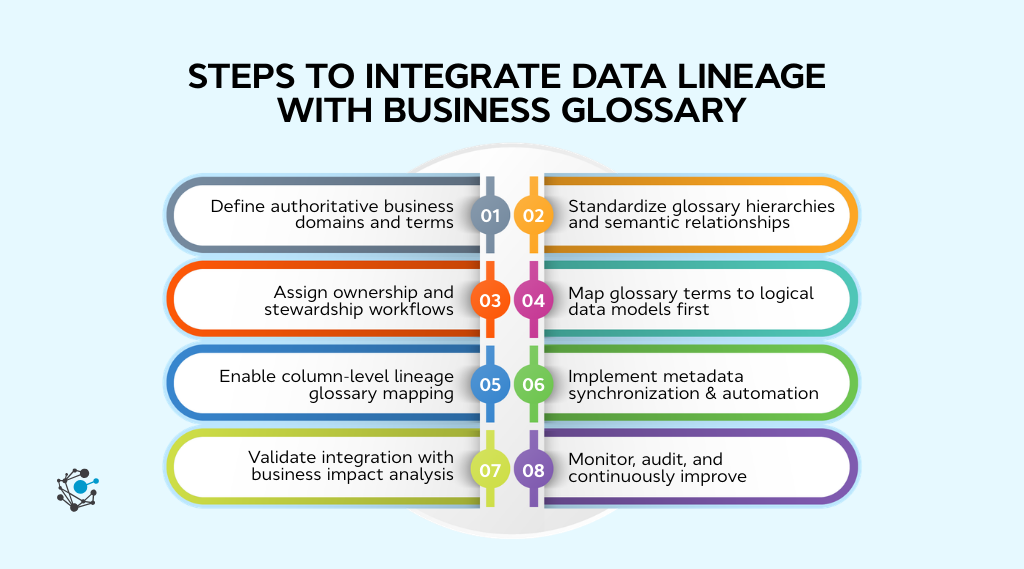
1. Define authoritative business domains and terms
Start by identifying key business domains, such as Revenue, Customer, Product, and Compliance. These domains provide the foundation for your glossary and must be clearly defined to ensure consistency across both business and technical teams.
-
Why it matters: Inconsistent or duplicated terms can lead to confusion and poor data integration.
-
Implementation tip: Begin with executive KPIs and work backward to define the supporting business terms. Align these terms with strategic business goals to ensure accurate data lineage mapping.
This step ensures your glossary aligns with critical business priorities from the outset.
2. Standardize glossary hierarchies and semantic relationships
The next step is to establish a standardized structure for your business glossary, including parent-child relationships, synonyms, and approved definitions. This ensures that terms are consistent, unambiguous, and easily understood by all stakeholders.
-
Why it matters: Clean semantic alignment is essential for accurate lineage glossary mapping. Without clear relationships, it’s difficult to ensure data is correctly linked to the right business context.
-
Implementation tip: Remove duplicate or conflicting terms before starting the technical mapping process. Create clear hierarchies that group related terms together, ensuring consistency across both business and technical teams.
By standardizing the glossary structure, you’ll lay the groundwork for smooth data lineage integration.
3. Assign ownership and stewardship workflows
Assign clear ownership for both business glossary terms and data lineage to ensure accountability and proper governance. This involves defining business stewards who manage glossary terms and technical owners responsible for the lineage integration.
-
Why it matters: Without defined ownership, there’s no clear accountability for maintaining the integrity of the glossary and lineage integration, leading to inconsistencies.
-
Implementation tip: Formalize approval workflows for term-to-asset mappings. Ensure that both business and technical teams collaborate to manage and update glossary definitions and their associated metadata as the data environment evolves.
By assigning ownership and establishing stewardship workflows, you ensure the long-term success and accuracy of your integration.
4. Map glossary terms to logical data models first
Before mapping glossary terms directly to physical tables, start by aligning them with logical data models and conceptual entities. Logical models represent the abstraction of data, connecting business concepts to the structure of data without getting into technical details.
-
Why it matters: Direct mapping to physical tables can introduce inconsistencies. By starting with logical models, you create a clear link between business terms and data assets before diving into technical details.
-
Implementation tip: Use logical entity diagrams as an intermediary layer. These diagrams provide a visual representation that links business terms to conceptual models, ensuring a smooth transition to physical asset mapping.
This step ensures a consistent, high-level framework before technical details are addressed.
5. Enable column-level lineage glossary mapping
To ensure precise traceability, map glossary terms to specific columns within your data tables, not just at the table level. This provides a granular view of how business terms are represented in the data, supporting KPI-level traceability and a clearer business context.
-
Why it matters: Table-level lineage provides general data flow, but it doesn’t offer the detailed traceability needed for decision-making, especially for KPIs.
-
Implementation tip: Focus on key metrics, such as financial or regulated data, which require accurate, column-level traceability. This helps ensure data integrity and compliance.
Column-level mapping ensures that each data element is connected to a business term with precision, enhancing transparency.
6. Implement metadata synchronization and automation
Automate the synchronization of metadata between lineage systems and the business glossary. This ensures that any changes in data structures, such as schema updates or transformations, are automatically reflected in both the lineage and glossary layers.
-
Why it matters: Manual updates can lead to mapping inconsistencies and drift between the glossary and lineage systems. Automation eliminates this risk and keeps both systems in sync in real-time.
-
Implementation tip: Use APIs or active metadata workflows to automate synchronization. This reduces the chances of human error and ensures that the data remains accurate and aligned across systems.
Automation streamlines the process, reducing manual effort and improving the reliability of the integration.
7. Validate integration with business impact analysis
Test the integration by tracing a key performance indicator (KPI) from a dashboard all the way back to the original data source. This validation ensures that the data lineage and glossary integration are working as expected, providing clear traceability and alignment with business objectives.
-
Why it matters: This step ensures that the integration is not only technically correct but also meaningful from a business perspective. It verifies that data is accurately traced from its origin to its final use in decision-making.
-
Implementation tip: Conduct validation workshops with key business stakeholders, such as finance or risk teams, to ensure the integration supports business needs and delivers value.
By validating the integration, you confirm that your lineage glossary model provides actionable insights and supports business decisions.
8. Monitor, audit, and continuously improve
To maintain the integrity of your lineage glossary integration, regularly monitor and audit the system to ensure it remains accurate and up-to-date. This includes tracking coverage and mapping accuracy as data environments evolve.
-
Why it matters: Data environments are dynamic, and as new data sources, models, or business terms emerge, it’s crucial to keep your lineage and glossary mapping current. Without continuous oversight, integrations may fall out of alignment, leading to inaccurate or incomplete data flows.
-
Implementation tip: Set quarterly governance review checkpoints to assess the coverage, accuracy, and relevance of the integration. Use feedback from both business and technical teams to refine the process and ensure it remains aligned with evolving business objectives.
Ongoing monitoring and audits will ensure that your integration stays relevant, accurate, and valuable to the organization over time.
Governance benefits of lineage glossary integration
Integrating data lineage with a business glossary strengthens how organizations govern data across analytics, reporting, and regulatory processes. When technical lineage connects directly with standardized business terms, teams can trace how metrics are created, understand the impact of changes, and collaborate around shared definitions. This alignment improves transparency across data systems and helps governance teams move from documentation to operational oversight.
Key governance benefits include:
1. Improved KPI traceability
Lineage connected to glossary terms allows teams to trace business metrics back to their source datasets, transformations, and pipelines.
For example, if a revenue KPI appears on multiple dashboards, lineage helps governance teams identify the exact data tables, transformations, and systems contributing to that metric. This visibility reduces disputes over numbers and improves confidence in reported metrics.
2. Faster impact analysis
When schema changes, pipeline failures, or transformation updates occur, lineage helps teams quickly assess downstream impact.
If a dataset supporting a financial metric changes, governance teams can trace which reports, dashboards, or AI models depend on that data. This allows teams to identify affected assets quickly and respond before inaccurate data reaches decision-makers.
3. Stronger regulatory auditability
Many regulatory frameworks require organizations to demonstrate where data originated, how it was processed, and how it was used in reporting.
By connecting business definitions with technical lineage, organizations can show a complete audit trail from business metrics to source systems. This supports compliance reporting and simplifies audit investigations by providing documented traceability across the data lifecycle.
4. Better cross-team collaboration
Business users often focus on metrics and terminology, while data engineers work with pipelines, tables, and transformations.
Lineage glossary integration bridges this gap by linking business definitions with technical data flows. Analysts, engineers, governance teams, and compliance stakeholders can view the same data assets through both business and technical contexts, which improves collaboration and reduces communication gaps across teams.
How to choose tools that support lineage glossary integration
Choosing the right tools to support the integration of data lineage and a business glossary is crucial for streamlining workflows, ensuring governance, and maintaining scalability. In this section, we’ll explore key factors to consider when evaluating tools for lineage glossary integration and provide actionable steps to guide the selection process.
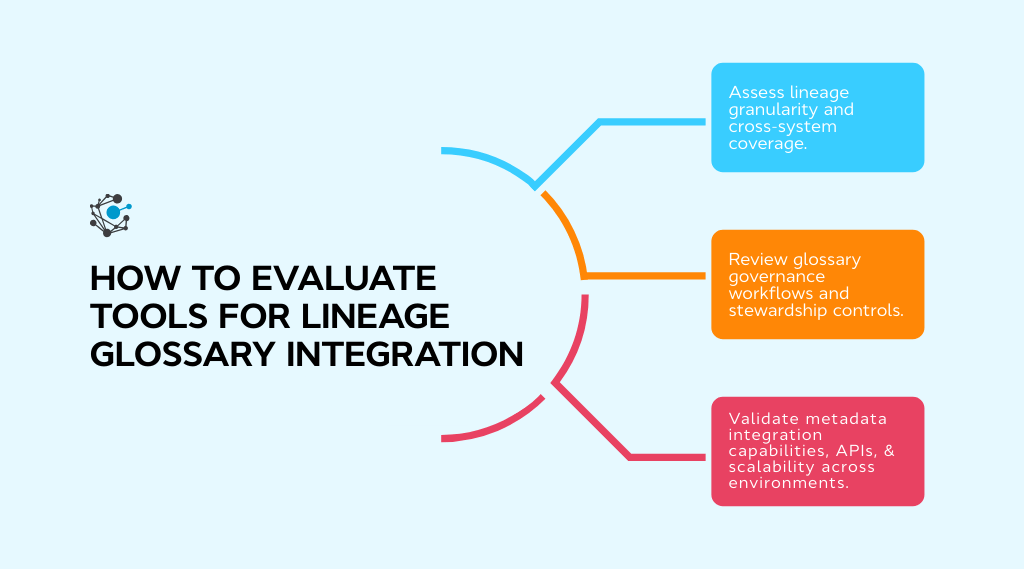
Step 1: Assess lineage granularity and cross-system coverage
The first consideration when choosing a tool is how well it supports lineage granularity. Granularity refers to the level of detail at which data flow is tracked. Tools that support both table-level and column-level lineage are essential for ensuring full traceability, especially when it comes to business glossary integration.
-
Column-level lineage: This is essential for linking glossary terms directly to specific data fields. Column-level lineage allows organizations to trace data from individual fields in source systems to reports, ensuring that every business term is connected to the correct data element.
-
Cross-system integration: Modern data environments often span across various systems, including ETL tools, cloud data warehouses, and business intelligence (BI) platforms. The tool you choose should provide visibility across these systems and be able to integrate metadata from all relevant sources.
-
Full coverage of data pipelines, from raw data to final reports
-
Granularity at both table and column levels
-
Integration with ETL tools, cloud platforms, and BI systems
-
Cross-system visibility to ensure no data flows are missed
A tool that offers high granularity and cross-system visibility enables you to map business terms to specific columns in data tables, rather than just general tables, ensuring greater precision and traceability.
Step 2: Review glossary, governance workflows, and stewardship controls
Effective governance of the business glossary is another critical aspect of successful lineage glossary integration. The tool should provide robust functionality for managing business glossary terms, including version control, stewardship, approval workflows, and change tracking.
-
Version control: As business terms evolve, it’s important to keep track of all changes made to glossary definitions. Version control ensures that previous versions of terms are preserved and accessible, allowing users to trace any changes that may impact data lineage.
-
Stewardship roles and approval workflows: To ensure consistency, business stewards and technical owners must work together to manage and approve glossary terms and their mappings to data. The tool should allow you to assign ownership roles and provide a formalized process for approving new terms or changes to existing ones.
-
Change tracking: Every time a term or its definition changes, it should be tracked within the system. This helps prevent inconsistencies and ensures that all stakeholders are aware of updates to business terms and their relevance to data flows.
What to look for:
-
Bidirectional synchronization to keep both systems in sync
-
Open and extensible APIs for seamless integration
-
Support for multi-cloud environments (AWS, Azure, Google Cloud)
-
Scalability to handle growing data volumes and complexity
Having strong governance controls in place ensures that your business glossary remains consistent, accurate, and aligned with evolving business needs, which is critical for maintaining the integrity of your data lineage integration.
Step 3: Validate metadata integration capabilities, APIs, and scalability across environments
Since metadata is at the heart of both data lineage and business glossary integration, the tool you choose must support seamless metadata synchronization. Ideally, the tool should offer bidirectional metadata synchronization, meaning that changes made in the business glossary are automatically reflected in the data lineage system and vice versa. This helps maintain consistency across both systems and ensures that data flow and business definitions remain aligned.
-
API extensibility: The tool should offer robust APIs that allow for easy integration with other tools and platforms in your data stack. This is especially important if you have custom systems or need to integrate third-party tools.
-
Multi-cloud compatibility: With many organizations moving their data environments to the cloud, the tool should support integration across different cloud environments, whether it’s AWS, Azure, or Google Cloud. This ensures that your metadata is synchronized, regardless of where your data resides.
-
Scalability: As your data environment grows, your tool should be able to scale alongside it. It should handle increasing data volumes and more complex data structures without compromising performance.
What to look for:
-
Bidirectional synchronization to keep both systems in sync
-
Open and extensible APIs for seamless integration
-
Support for multi-cloud environments (AWS, Azure, Google Cloud)
-
Scalability to handle growing data volumes and complexity
Tools that support bidirectional synchronization and have robust APIs for integration are key to maintaining accurate, up-to-date metadata and ensuring the long-term success of your lineage glossary integration.
|
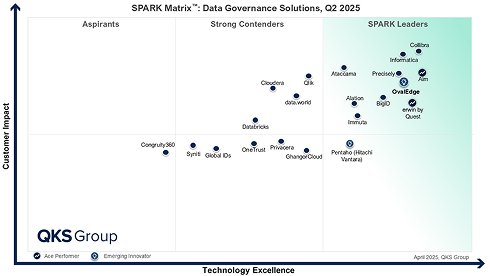
Some modern data governance platforms combine these capabilities into a single environment. For example, OvalEdge integrates automated data lineage, business glossary management, and metadata synchronization within one platform. This allows organizations to connect business definitions with technical data flows while supporting stewardship workflows, impact analysis, and governance monitoring across their data ecosystem. |
Conclusion
Integrating data lineage with a business glossary helps organizations connect technical data movement with clear business meaning. When lineage and glossary systems work together, teams can trace how business metrics are created, understand where data originates, and see how transformations shape the information used in reports and dashboards. This level of transparency strengthens data trust and helps both technical and business teams work with the same definitions and context.
As data environments grow across cloud platforms, pipelines, and analytics tools, manual governance quickly becomes difficult to maintain. Automated lineage capture, column-level traceability, and synchronized metadata ensure that glossary terms stay connected to the underlying data assets they represent. This makes impact analysis, compliance reporting, and data quality investigations far more efficient.
Platforms such as OvalEdge bring these capabilities together by combining business glossary management, automated data lineage, and active metadata in a single governance environment. This allows organizations to align business definitions with technical data flows while maintaining governance workflows, stewardship roles, and continuous monitoring.
If you're looking to connect your lineage and glossary layers while improving enterprise data governance, the right platform can make the process significantly easier.

Book a meeting with the OvalEdge team to see how integrated lineage, glossary management, and metadata automation can help your organization build trusted, traceable data across your entire ecosystem.
FAQs
1. What is data lineage glossary integration?
Data lineage glossary integration connects technical data flows with standardized business terms. It links tables, columns, and transformations to glossary definitions, enabling clear traceability from source systems to dashboards while ensuring data is understood within the correct business context.
2. How do you connect lineage to a business glossary?
You connect lineage to a business glossary by mapping glossary terms to logical data models and then linking them to physical tables and columns captured in lineage metadata. Automation and stewardship workflows help maintain accurate mappings as data pipelines evolve.
3. Why is column-level lineage important for glossary integration?
Column-level lineage allows organizations to trace specific data fields across transformations and systems. This precision enables accurate mapping of glossary terms to data elements, improving KPI traceability, impact analysis, and governance for financial or regulated metrics.
4. Can lineage glossary mapping be automated?
Yes, lineage glossary mapping can be automated using active metadata tools, APIs, and rule-based tagging. Automation helps synchronize metadata, detect schema changes, and keep lineage and glossary definitions aligned without relying on manual updates.
5. What challenges occur when integrating lineage with a glossary?
Common challenges include inconsistent glossary definitions, lack of column-level lineage, fragmented metadata across tools, and limited governance workflows. Addressing these issues requires standardized terminology, automated metadata capture, and collaboration between business and technical teams.
6. What tools support lineage glossary integration?
Modern data governance platforms integrate business glossary management, automated lineage, and metadata synchronization. Solutions like OvalEdge help organizations connect business definitions with technical data flows while supporting stewardship, impact analysis, and scalable governance.
.png?width=1081&height=173&name=Forrester%201%20(1).png)
.png?width=1081&height=241&name=KC%20-%20Logo%201%20(1).png)